Conversation

Vodafone
IN
Last activity: 15 Nov 2025 6:26 EST
Pega Cloud - Records Manager - Removed Data Objects
we observed even we removed object from App studio or dev studio, we can see those objects from Portal Record manager icon on side panel. is there any way remove ?
any idea why those are present even after deleted ?
is there any way to import records from Records manager for s specific data object?

Pegasystems Inc.
PL
@VenkateswararaoKhi, can explain a little be more in details what you mean by: Portal Record manager icon on side pane
printscreens will be helpful
Vodafone
IN
Vodafone
IN
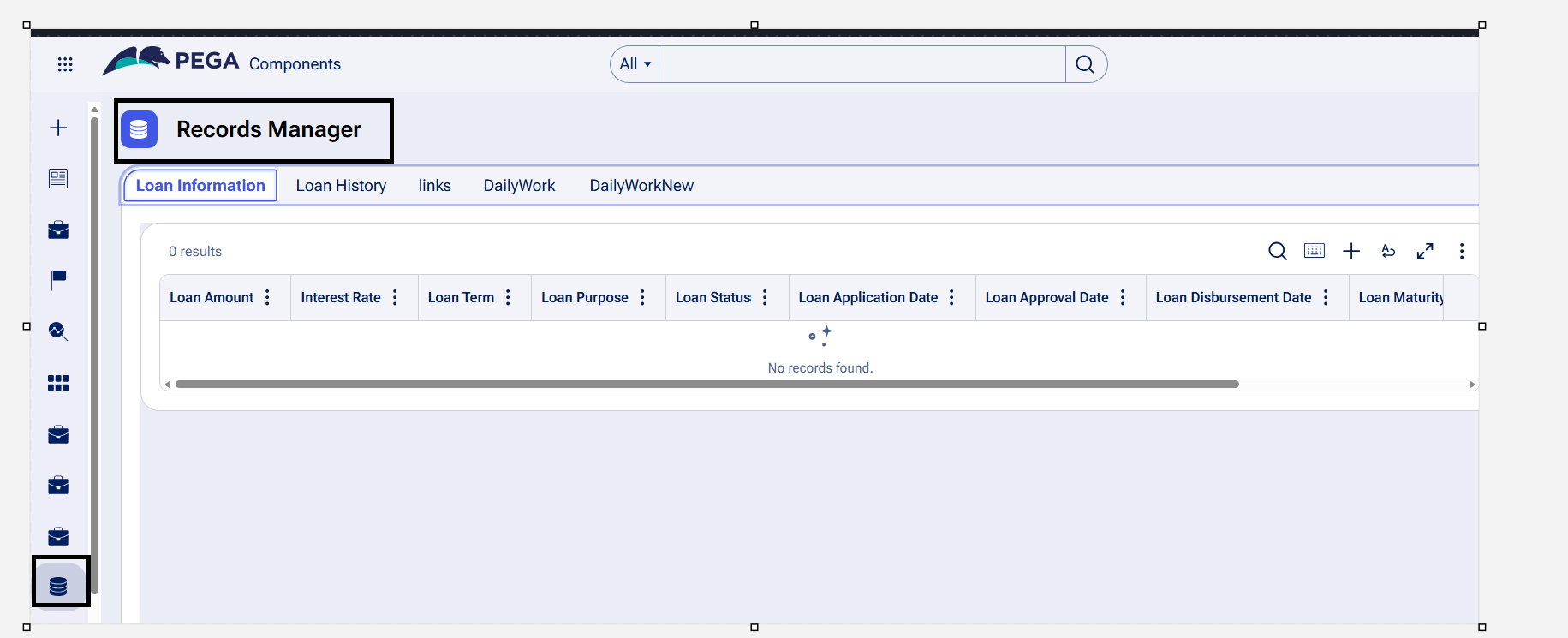
Thanks for the quick reply. please refer the below similar screenshot.
we are currently using 24.2 version we are deleted few data types from Dev studio but still we can see deleted data objects present in Record Manager with error message as "Invalid PageID entered".
1. any idea why they are still present.
2. how to delete these from record manager as well
3. is there any way to restrict this record manager visible only to few access groups?

Pegasystems Inc.
SE
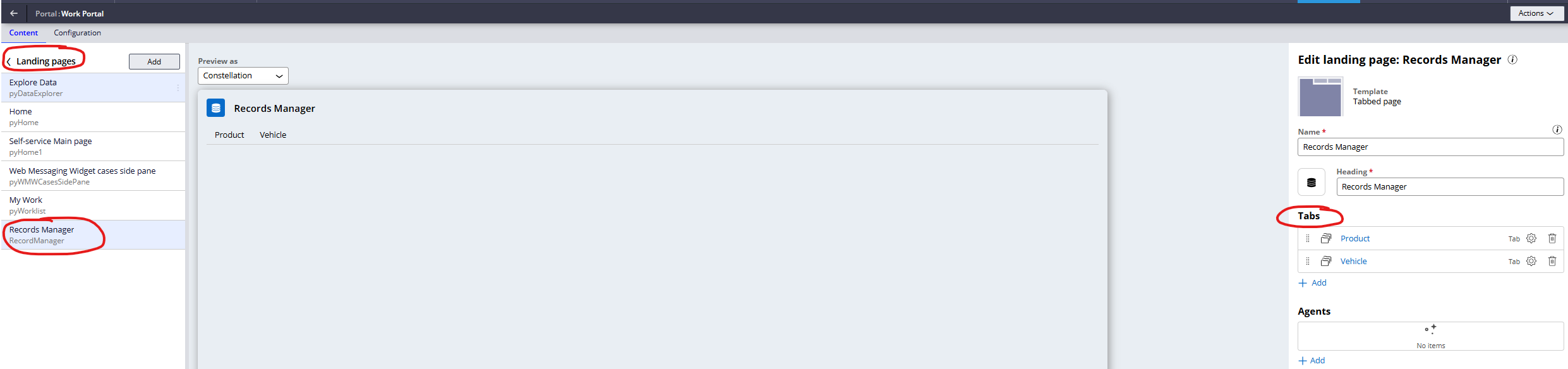
@VenkateswararaoKThe configuration for the tabs of the records manager lives in the landing page configuration in the channel. From there you can control which objects you want to present in the records manager landing page. It's similar to how you configure which records are available in the Explore data landing page.
Pegasystems Inc.
SE
@VenkateswararaoKAnd as for the access to the landing page, I would give the different types of users an appropriate portal/channel. That way you can choose which landing pages are present on each channel. Alternatively, there is the page visibility you can configure for the landing pages in the channel, but I would be cautious as to not introduce a lot of hidden visibility conditions just for making a single channel which caters to everyb type of user.

Pegasystems Inc.
GB
@VenkateswararaoK records manager is just a Blueprint Import module created landing page that gives you a bunch of List Views with CRUD actions on them. There's a lot to that statement, so lets break it down.
Configure your own Landing Page
I love this landing page, it surfaces up a Constellation capability that is often missed but extremely powerful. Records Manager, is a nice prescribed and ready made version of "CRUD actions on data". However, before Blueprint Import brought this along, you could build it yourself:
So if the outcome the business needs is not met by this OOTB landing page, you can build your own Landing Pages and List Views to provide the outcome needed. I've seen some projects talk of grouping records so you could configure certain features together. E.g. I need to update 3 records for a cascading drop down administration. In this case, building your own landing pages, using Records Manager as inspiration is a good fit.
App Studio Gap
@VenkateswararaoK records manager is just a Blueprint Import module created landing page that gives you a bunch of List Views with CRUD actions on them. There's a lot to that statement, so lets break it down.
Configure your own Landing Page
I love this landing page, it surfaces up a Constellation capability that is often missed but extremely powerful. Records Manager, is a nice prescribed and ready made version of "CRUD actions on data". However, before Blueprint Import brought this along, you could build it yourself:
So if the outcome the business needs is not met by this OOTB landing page, you can build your own Landing Pages and List Views to provide the outcome needed. I've seen some projects talk of grouping records so you could configure certain features together. E.g. I need to update 3 records for a cascading drop down administration. In this case, building your own landing pages, using Records Manager as inspiration is a good fit.
App Studio Gap
Records Manager is new. With a lot of new features, we don't quite see the round trip affect you are expecting when you delete those records. Blueprint Import creates the Landing Page and the Views needed but the delete button on data from the Application clearly isn't updating that Landing Page or Views. Way back in '23 we used to see this for updating Primary Fields, existing Views using this did not get updated.
I've raised some feedback for this (FDBK-135012) so hopefully we can round trip this feature.
Access Control and Run time
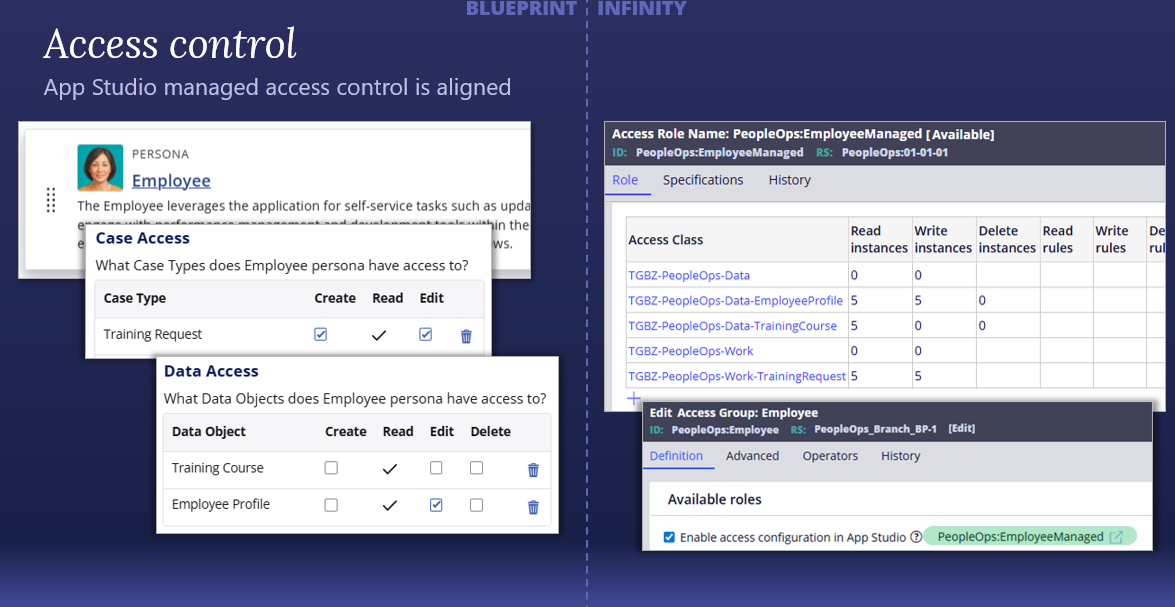
The actions to each data object will be governed by the access controls you have put in place in your Persona > Settings in Blueprint, once imported into Pega Platform it creates Access Role to Object rules which will be honoured in Portal Manager.
- So you're first concern about people seeing them, so long as you got this right, it shouldn't be seen at run time for that Persona. I suspect, because you are running this as a Developer you are seeing the full access. Which wouldn't be the same as the run time experience.
I was just doing some Blueprint Delivered Workshops where we were explaining this, maybe this image helps. A sneak peak before @BradTanner / @DionLammers add our workshops to the Blueprint Expert Circle: