
Conversation

Pegasystems Inc.
CA
Last activity: 18 Jan 2026 18:59 EST
Make Pega Agents Feel Instant: Event Streaming Explained
Introduction When creating GenAI-enabled agents, we often prioritize what the agent says—but the way the response is delivered is just as critical. In practical scenarios, GenAI responses aren’t instantaneous. The agent might invoke tools, fetch data, verify information, or run through several reasoning steps before reaching a final answer. If the UI remains idle until everything finishes, it can feel slow, unresponsive, and unreliable. Event Streaming changes this dynamic. By sending responses incrementally, it boosts perceived speed, helps avoid timeouts, and enables more interactive experiences—especially in Pega embedded contexts.
What is Event Streaming? Event Streaming is a pattern where the server sends a response gradually in small parts rather than returning a single, complete payload at the end. A common approach is Server-Sent Events (SSE), where the server emits a sequence of events such as: event: message data: {"content":"Thank"}
event: message data: {"content":" you for providing your information."} Instead of waiting for the entire completion, the UI receives content progressively and displays it like a live conversation.
Why Streaming is a Perfect Fit for GenAI GenAI interactions naturally lend themselves to streaming because:
- LLM outputs can be lengthy
- Tool invocations may be slow
- Multiple steps occur before the final response
- Users expect chat experiences to feel immediate Streaming aligns well with modern conversational UX standards.
Key Benefits of Event Streaming for Pega AI Agents
1) Better User Experience (Faster Perceived Performance) Streaming delivers initial tokens quickly, even when the full response takes longer. This produces a “typing” feel and reduces frustration.
- Users receive instant feedback
- The app feels modern and responsive
- Shorter “time-to-first-token”
2) Prevents Gateway / Infrastructure Timeouts In enterprise setups, long-running requests risk timeouts at:
- API gateways
- Reverse proxies
- Load balancers
- Firewalls Streaming keeps the connection active by continuously sending data.
- Lower chance of “request timed out”
- More stable experiences for lengthy responses
3) Enables Real-Time Agent Interactions Streaming lets you present:
- Partial answers
- Confirmations
- Explanations
- Progress-style updates (e.g., “Let me check that…”) This is especially useful when the agent queries systems or performs validations.
- Feels like a live assistant
- Reduces uncertainty during waits
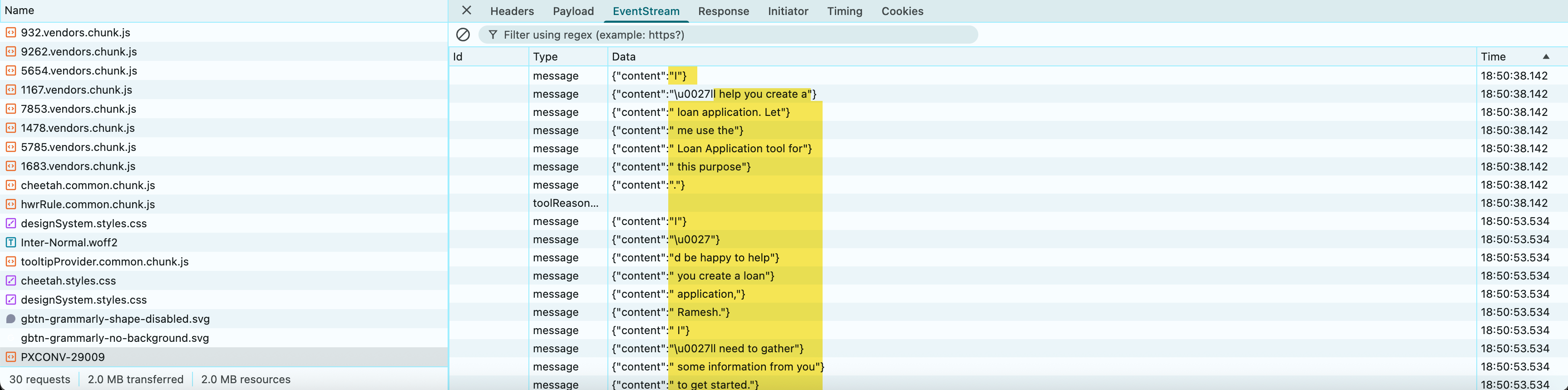
What Does Streaming Look Like in Practice? In Chrome developer tools, a streaming response might appear as: event: message data: {"content":"Thank"}
event: message data: {"content":" you for providing those details."}
event: message data: {"content":" Let me collect additional information..."} Rather than a single JSON object, the server delivers a series of incremental updates.
Demo:
Common Implementation Considerations
- Buffering Some intermediaries buffer output and deliver it late. Verify that your infrastructure supports true streaming without buffering.
- Content format Use JSON for each event to maintain flexibility: {"content":"some text", "sequence": 12}
- UI rendering logic - The UI should append each new content fragment to the chat area.
Final Thoughts Streaming is more than a visual enhancement—it’s a core capability for production-grade GenAI systems. For Pega-powered agents, streaming delivers:
- A faster, more human experience
- Orchestration-friendly, scalable architecture
- More resilient connections across enterprise infrastructure
- Better control and observability of agent responses Enable streaming early in your Pega build to make your agent feel markedly more responsive and enterprise-ready.
Pega GenAI Cookbook - Recipes series
Enjoyed this article? See more similar articles in Pega Cookbook - Recipes 🔥🔥🔥 series.