Pega Marketplace Terms of Use
Pega Marketplace
Visual Studio Code Extension for DXCB
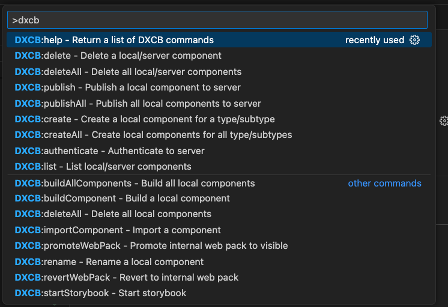
DXCB Commands via Visual Studio Command Palette and Right Click actions
By using or submitting listings via the Pega Marketplace, you agree to our Terms of Use.
Overview
Utilizing DXCB in Visual Code Studio, extension allows users to find DXCB commands via Command Palette as well as specific commands in right click menus.
Key Features
- Don't have to remember numerous DXCB commands
- Commands can be selected and will automatically run in terminal window
- All DXCB Commands available in Visual Studio Command Palette (Ctrl (Command) + Shift + P)
- Specific commands via right click menu in Explorer Panel
- All Commands via right click in Terminal window
- Requires PegaInfinity 24.2 and DXCB 24.2.10 (or higher)
Resources

Version
1.0
Compatible with
Pega Platform '24.2Product Owner
Paul GagnonLast updated
January 7, 2025Product Capability
User ExperienceScreenshots: