
Conversation

Wellsfargo
IN
Last activity: 9 Jan 2026 10:51 EST
How can we freeze last row in a table (list view) - Pega Constellation UI
Hi,
We have a below requirement,
1.User will add the records to embed list view manually from a local action.
2. Once user submits the local action we will run the post processing logic and adds one more record at the end to page list with totals.
3. In case tabs we want to show the list view with user entered records and totals record in the table view. when table had 100+ records we want to freeze the total row in the list view when scrolls the table vertical scroll to see the records.
Is there any OOTB configuration for this ? ( freeze last row in the table)

Pegasystems Inc.
GB
@SreenivasuluV16633502 I'd be curious on others experiences here. Constellation tables do not provide a total capability on embedded data tables like this - they do however, in '25, provide for an aggregate function in Insight tables.
Just to clarify, when you say "local action" are you talking about the native Constellation feature to add rows via modal OR are you planning on creating a case wide optional action that updates the embedded data? This is important for option 4 below.
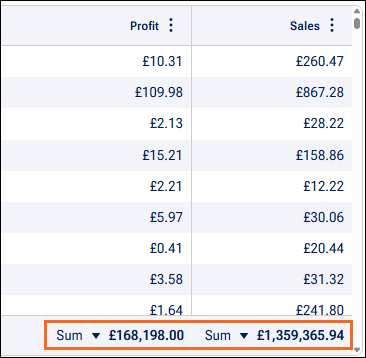
So, when it comes to Embedded Data, you do not have this table capability. I had this question late last year when we did a Blueprint Workshop in Amsterdam and did do research.
@SreenivasuluV16633502 I'd be curious on others experiences here. Constellation tables do not provide a total capability on embedded data tables like this - they do however, in '25, provide for an aggregate function in Insight tables.
Just to clarify, when you say "local action" are you talking about the native Constellation feature to add rows via modal OR are you planning on creating a case wide optional action that updates the embedded data? This is important for option 4 below.
So, when it comes to Embedded Data, you do not have this table capability. I had this question late last year when we did a Blueprint Workshop in Amsterdam and did do research.
- Create calculations in your case data model and display the data outside the table (lowest code, easiest implementation)
- Hack the JSON / Theme of your tables to lock a sum as final row (not recommended).
- I mention this because this is what the attendee had managed to do but, as you might expect, it had bugs, which we could not solve. I mention this option as more a cautionary tale
- Create your own table DX Component that provides this capability. Tables are one of the harder DX Components to build, even those who live in DX Components space day to day say this is one of the hardest to achieve (they don't recommend it if it can be avoided)
- IF you are doing this as a local action, not embedded data / modal to add rows, this MIGHT open up another option. It is possible to run Insights on case data, including embedded data. They can only be displayed in Case Tabs but by going this route, you would open up the Insights feature I mentioned earlier.
What is your experience?
I'd love to know others experience here, to the best of my knowledge, I don't believe this is possible OOTB with embedded data tables. EVEN with some questionable customizations I've only seen this buggy at best (which you would expect).
Future enhancement?
Based on this history, we have raised feedback to get this native for embedded data tables. They are on our backlog for triage by our Product Teams - I will be noting this question too, hopefully that adds some weight to prioritization.
- FDBK-134933 Ability to put column totals in a Constellation table
- FDBK-75456 Table with summarized totals columns

Novitates
IN
@MarcCheong Completely agree with Marc's analysis. We don't have this possibility OOTB and even with customization this might not be fully achievable. So, better it would come as a native capability similar to what we have in Insights.
Thanks
JC

Pegasystems Inc.
NL
@JayachandraSiddipeta just a couple of thoughts that might help you in your design/implementation:
1. Are you sure this list of records should be embedded data? You could make a data/case reference (multiple items) instead, treating the items as separate instances in the database, either case (in case the record itself has nested data) or data (in case of a more simple, non-nested data model). In my experience, the embedded option is often the first option we go for - but this is not always the best or even right approach. Remember embedded data means that the records are uniquely part of and tight to the case and are subject to user editing within the case only. So its good to reflect on this i think.
2. If the data really needs to be embedded, you could (if you have not yet done this) make an index of your embedded data to be able to report.
3. With an insight you can easily display the related data/case records and (with 25.1 add multiple filters) in a case tab to show case related data. If you have case/data referenced or embedded data indexed, this should work and then you can use the Insights features.
4. If it is not feasible to enable Insights (having considered the above), my suggestion would be to create aggregate fields on work level with declare expressions and display them underneath the embedded data table. Just like traditionally done order lines in an order for example.
Novitates
IN
@schos1 Appreciate your valuable insights. The approach provided by you works perfectly with Data reference -> Embedded list -> Index table -> Insights approach.
Attached is the document which has the demo implementation as per your idea. No customization, no heavy implementation and just pure OOTB features utilized.
@SreenivasuluV16633502 You can try the same and you should be able to the get total displayed at the end of the table in the tab.
Thanks
JC
Pegasystems Inc.
NL
@JayachandraSiddipetathis looks awesome! Well done. As i can see from your screenshots, you dont use embedded data but just a data reference. Or is there more happening in the background (embedding the data that was selected from the data reference for example)? Anyway, great example of the power of insights. We made a great leap forward with 25.1, many useful new features including this and also the ability to use all relevant case context fields to filter an insight.
Novitates
IN
@schos1 Yes, i have created two fields, one data reference which takes up the selection of the user and in the post processing i have copied the selected entries to an embedded list field and then it goes into the index table.
Indeed, for me personally the most loved feature of constellation is Insights as it has got huge potential to implement complex functionalities. Happy to know about this use case from you which will be useful for many developers in their applications.
Regards
JC