
Conversation

Virtusa (pvt) Ltd.
GB
Last activity: 29 Dec 2025 11:42 EST
Navigation from one tab to another tab
Hi,
I have below requirement in Pega Constellation application.
- User opens a case
- Clicks on Overview tab (from the left navigation)
- Clicks on a link ("Go to Details") on the Overview page
- Details tab > Details page is loaded
- User can quickly view the detailed information of the case
Can this be achieved in Pega Constellation?
Thanks

Novitates
IN
@NIRANJANDJ Please elaborate your requirement in detail with some screenshots if possible ?
Thanks
JC
Virtusa (pvt) Ltd.
GB
Hi JC, Please see Navigation_Requirement.docx for detailed requirement with screenshots. Thanks
Novitates
IN
@NIRANJANDJ So, this is my understanding. Correct me if it's otherwise.
When i click on Overview tab, i have a screen which has multiple views displayed (expandable/collapsible, minimal information) with a link "View Details" provided for each view. Upon click of View Details link for any of the view, you should be redirected to open another tab (Details) where you have all the views categorized as tabbed layout and appropriate tab should shown by default.
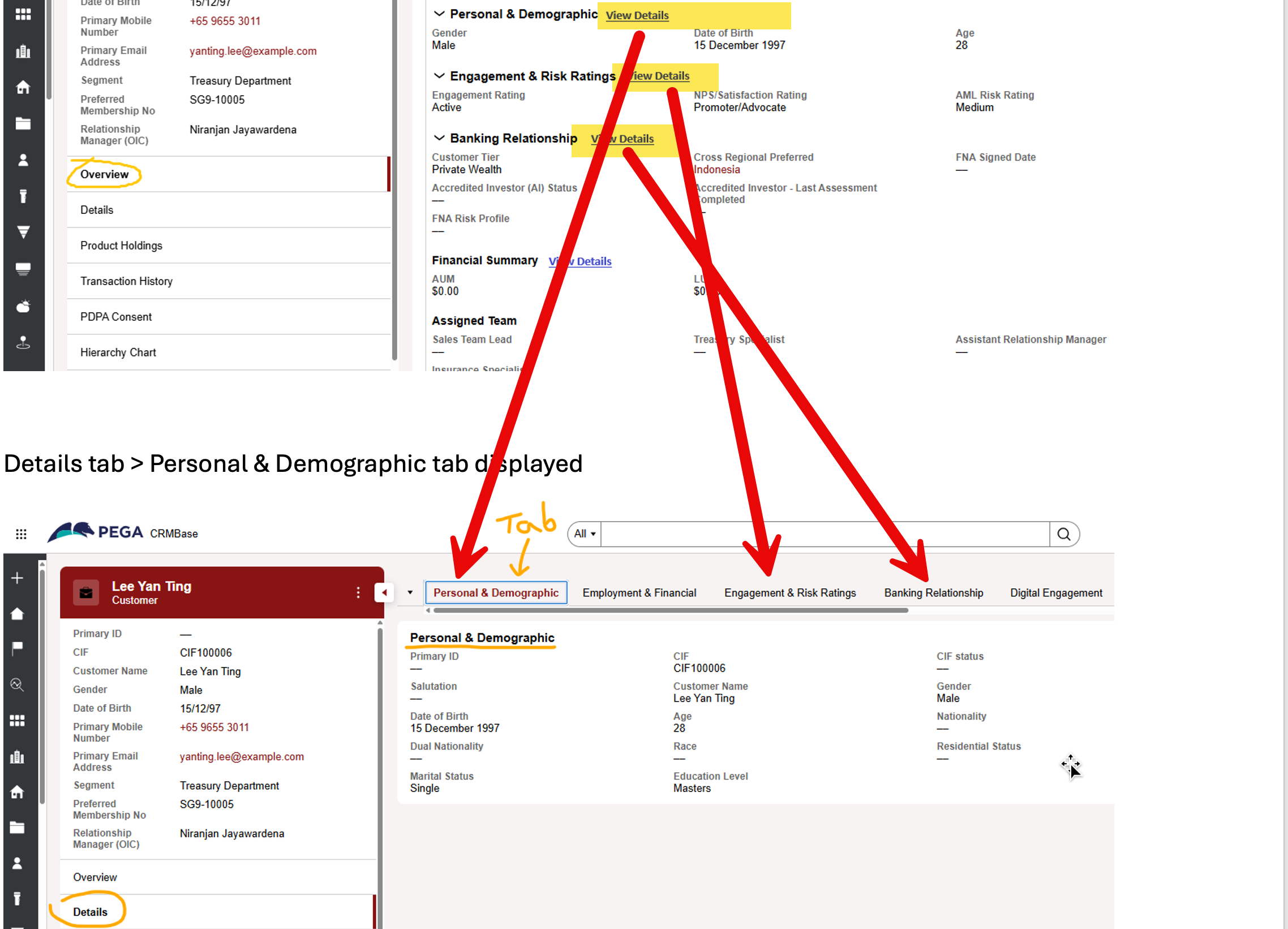
As such there is no OOTB way of achieving this feature. Either we might have to think of an alternative mechanism to get a similar behaviour in a different way in OOTB or write a custom component for the link and give it a way to identify the specific tab (associated view) and open it. I will verify and post here if i find a solution.
Regards
JC
Virtusa (pvt) Ltd.
GB
@JayachandraSiddipeta Hi JC, Yes your understanding is correct on the requirement.
Okay, please post here if you find a solution. Thank you.
Regards
Niranjan
Novitates
IN
@NIRANJANDJ Hello Niranjan, after a deep dive into the use case, below is my analysis.
@NIRANJANDJ Hello Niranjan, after a deep dive into the use case, below is my analysis.
- I understood the point that in the Overview screen you want to show minimal information for a particular page and give a "View Details" link to the user to navigate to another tab's tabbed view where you have detailed information (more/all fields).
- Discuss with your business and see if they would be open for any other alternatives like,
- Showing only Details tab where you will have multiple sub tabs as usual that will show the detailed information for each of the view. No overview tab at all.
- Showing each sub tab view as individual tabs, so that user will know exactly which tab to click and in that tab you can divide the information into two parts, like Priority information first and Additional information below. This would avoid additional clicks and tab switching as well. No overview tab at all again.
- You cannot have a link on the field group heading. Suppose, you managed to refer a Dynamic Text rule in the heading and want to populate the heading plus a link as a rich text context mounted on a property reference with declare expression, still Dynamic Text rule does not support Rich text content. So you are forced to put the "View Details" link inside the field group.
- Now to show the intended view which is technically in another tab is practically not possible directly on click of a link (to my best knowledge). You have to switch the tab and in turn switch to the particular view. In my opinion, this does not give a good user experience.
- So you are forced to create a custom URL component and pass the view name, local action to render either in a modal window or show as a preview pane which pops up as a drawer from right side of the screen similar to the case preview or data object preview.
- If you write a custom URL component, then showing the intended view in a modal window on click of a link is kind of easy with minimal effort. But showing it in a preview pane from right side is kind of nice but complex to implement. This would actually makes it more user friendly as i would be still be in the same screen but would be seeing other views without switching the tab.
I tried implementing the hardest part (Preview Pane) as an exploratory use case which is showcased in the below video for reference.
You can take this as an inspiration and sit with your UI developer and build it keeping accessibility, security, OOTB styling, user experience in consideration. You have to be extremely cautious before you go into this path.
General Caution: Custom components should be considered only when the requirement is critical, has a significant business impact, and there is no suitable out-of-the-box feature in pega or agreed alternative mechanisms.
A Wish for the Future 🚀
It would be extremely valuable if Pega provides native support for preview a specific view from anywhere in the application on click of a link, as a drawer pane coming from the right side of the screen.
Any further thoughts, feelings, ideas from the expert circle members is appreciated..
Hope this helps
Thanks
JC