
Conversation

Pegasystems Inc.
CA
Last activity: 24 Dec 2025 14:18 EST
On‑the‑Fly Casework: Pega GenAI Ad Hoc Cases for Exception Mastery
Overview In real-world Case processing, exceptions inevitably arise—such as missing details, conflicting information, new stakeholders, or regulatory checks that weren’t identified during design. Pega GenAI-powered ad hoc Cases empower Case workers to address these situations instantly and safely, without waiting for a release cycle. Users describe their needs in a prompt, Pega GenAI proposes a workflow, and the user can fine-tune the Steps before launching the ad hoc Case.
Example A mortgage Case worker notices a gap between the customer’s stated property value and the agent’s estimate. The worker initiates a GenAI ad hoc Case and requests to “investigate the discrepancy in property valuation, contact the listing agent for comps, and confirm the customer’s appraisal.” Pega GenAI then produces a concise, targeted workflow with Steps such as Gather comps, Send email to agent, and Record appraisal confirmation.
How It Works
- At run time, a user launches an ad hoc Case from the current Case context.
- The user provides a prompt; Pega GenAI recommends a workflow (Steps).
- For each Step (for example, Send email), the user configures details like recipients, subject, and message.
- The ad hoc Case operates like a standard Case with full audit, assignment, and SLA capabilities, and can be optionally linked to the Case.
Prerequisites
Design-Time Steps: Adding the Ad Hoc Case Option to a Case Type
- In the navigation pane of App Studio, click Case Types, and then click the Case Type that you want to open.
- On the Workflow tab, click Optional Actions.
- In the Case-wide Actions section, click Action, as shown in the following figure:
- Workflow tab of a Case Type with an option to add an optional Process.
- Adding an optional Process to a Case Type
- Click More > Processes > Initiate Ad-hoc Case, and then click Select.
- Click Save.
Run Time
- Log in to an end-user Portal.
- Create a new Loan application case.
- Click Actions > Initialize Ad hoc <Case Type name>.
- In the Description field, briefly describe the unexpected event that you want to handle with the ad hoc Case.
- For example: Enter The income declared by the applicant differs from the income recorded in the credit record.
- Optional: To add more Steps, in a Stage, click Add Step, select the Step type that you want to add, and then provide relevant configuration.
- Click Submit.
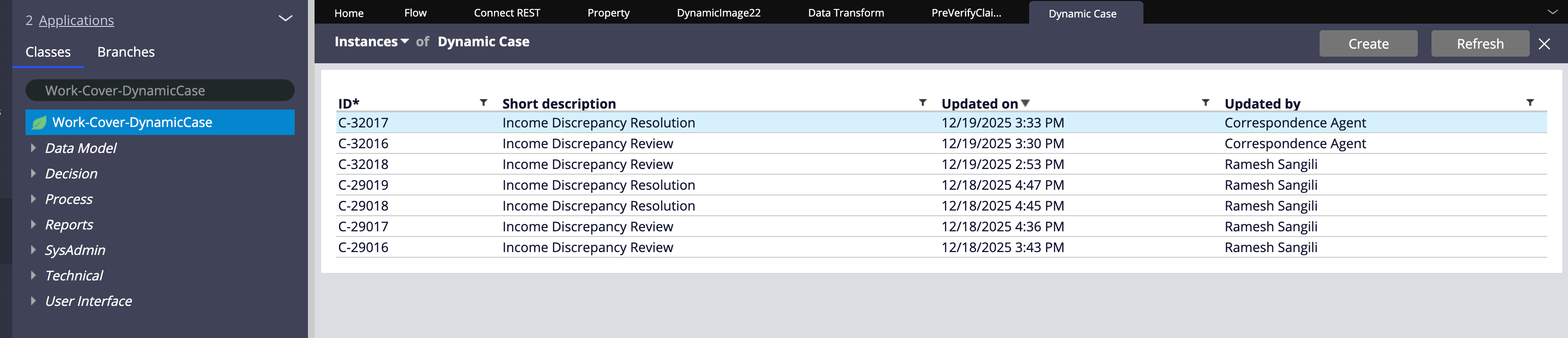
The Ad-hoc case instances are created in Work-Cover-DynamicCase. pyOriginatingCaseID holds the Case ID information of the Originating Case.
Demo:
will be uploaded soon.
Constellation 101 Series
Enjoyed this article? See more similar articles in Constellation 101 series.
Interested in more Pega Gen AI series - Visit Pega Gen AI Series