
Conversation

Virtusa Ltd
LK
Last activity: 31 Dec 2025 1:41 EST
Action Order in Optional Actions Menu
Hi Team,
In Pega Constellation 25.1, I have a requirement to change the Action Menu ordering (Optional Actions / More Actions). Currently, the actions are displayed in alphabetical order by label.
Is it possible to change the action order (for example, to a custom or non-alphabetical order)?
Thank you for your help!

Novitates
IN
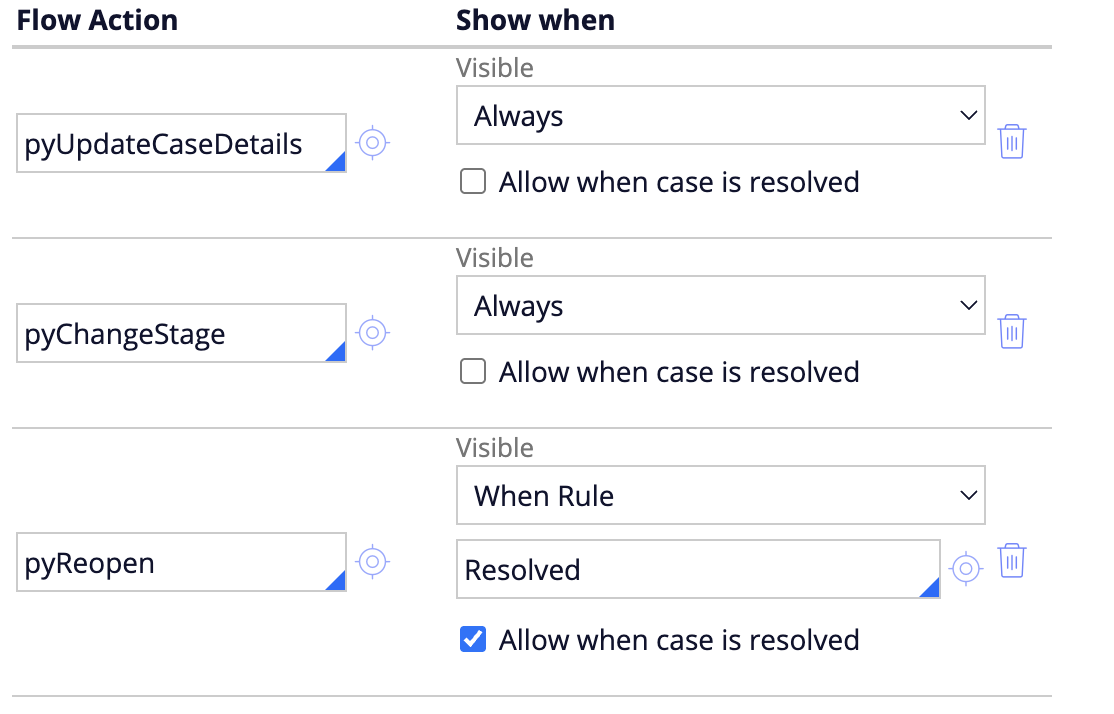
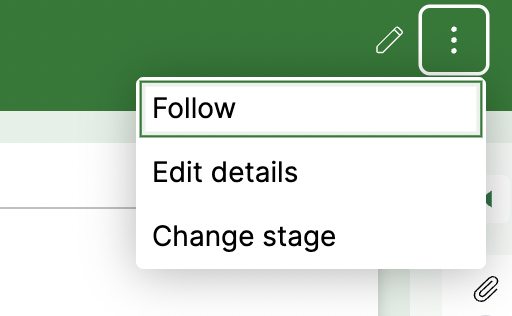
@Zumry To my best knowledge from constellation perspective, you cannot change the order of the actions as they are populated using the populateFlowActions function internally. The only thing i noticed is the that if you change the order of placement of the actions in the case type rule, then the same order is preserved on the UI as well. May be if you have any specific order to display which will not change frequently, you can update the case type accordingly.
Before change
After change
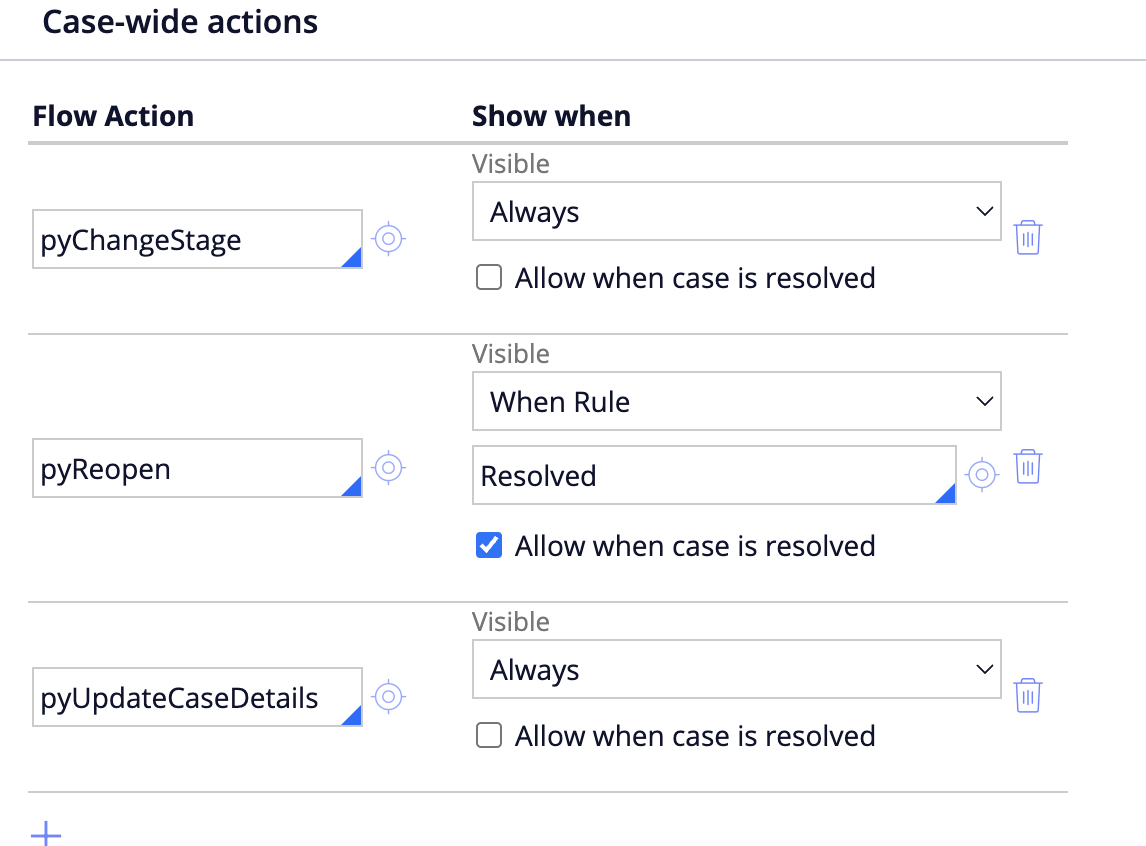
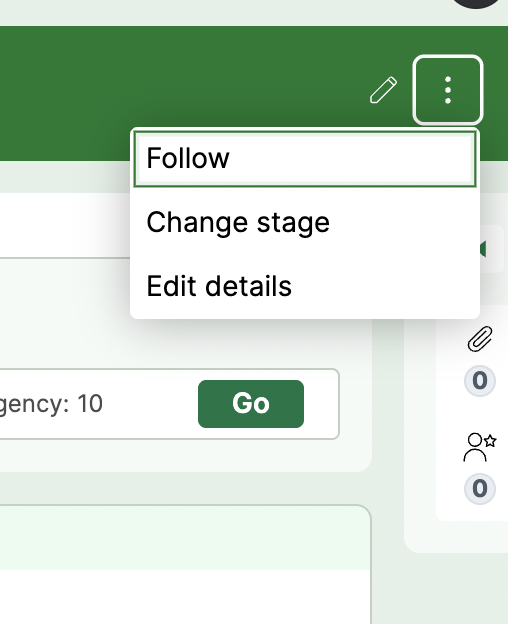
@Zumry To my best knowledge from constellation perspective, you cannot change the order of the actions as they are populated using the populateFlowActions function internally. The only thing i noticed is the that if you change the order of placement of the actions in the case type rule, then the same order is preserved on the UI as well. May be if you have any specific order to display which will not change frequently, you can update the case type accordingly.
Before change
After change
If you don't need the Follow option, you can disable it by saving when rule pyHideFollowAction in your application ruleset and make it to true. This will hide the Follow option for all the case types in your application.
Hope this helps. Other members can share their thoughts on this if they have any other option available.
Thanks
JC

Pegasystems Inc.
US
@JayachandraSiddipetaI took a look at this in the my instance and there does not appear to be a way to drag them to change the order. I assume you retyped them to change the order placement. Is that correct?
Novitates
IN
@garce Yeah that's right. Just played around to check how pega is rendering the items order in constellation. Hence i noticed the alternative that if we can't configure the order, then at least set them up in an specific order.
Thanks
JC
Virtusa Ltd
LK
@JayachandraSiddipeta I'm using the Sales Automation Framework. The actions are configured as case wide supporting processes in the Case workflow during design time, in the required order.
However, at runtime, the Optional Actions menu still displays the actions in alphabetical order by label, instead of the configured sequence.
Novitates
IN
@Zumry Summing up your requirement and analysis from my end.
Understanding Case Actions Navigation List in Pega Constellation
At a high level, the Case Actions navigation list in Pega Constellation is populated by collating data from three distinct sources:
1. Follow Action
- The Follow action is controlled using the
pyHideFollowActionwhen rule in the Work Portal. - However, it is worth noting that this condition does not seem to be applied in Self-Service portals (an observation from recent analysis). @Kamil Janeczek @MarcCheong You may want to take this up with the engineering team and let us know more about this gap.
2. Available Actions
These actions are populated based on the configuration in the Case-wide Actions section of the case type.
- The actions are rendered as configured, without any default sorting.
- The UI reflects the order returned by the framework, with no explicit sorting applied.
3. Available Processes
Supporting processes are sourced from the Case-wide Supporting Processes configuration.
@Zumry Summing up your requirement and analysis from my end.
Understanding Case Actions Navigation List in Pega Constellation
At a high level, the Case Actions navigation list in Pega Constellation is populated by collating data from three distinct sources:
1. Follow Action
- The Follow action is controlled using the
pyHideFollowActionwhen rule in the Work Portal. - However, it is worth noting that this condition does not seem to be applied in Self-Service portals (an observation from recent analysis). @Kamil Janeczek @MarcCheong You may want to take this up with the engineering team and let us know more about this gap.
2. Available Actions
These actions are populated based on the configuration in the Case-wide Actions section of the case type.
- The actions are rendered as configured, without any default sorting.
- The UI reflects the order returned by the framework, with no explicit sorting applied.
3. Available Processes
Supporting processes are sourced from the Case-wide Supporting Processes configuration.
-
Unlike case-wide actions, these entries are sorted by Display Name before being rendered on the UI.
Key Observations and Limitations
-
Both Available Actions and Available Processes are populated using final rules.
-
Due to this, the sorting order cannot be customized either during data fetch or at load time.
-
No explicit extension points are currently found to influence or override the sorting logic for these lists to my best knowledge and analysis.
Thought for Enhancement
If this requirement needs to be addressed in a flexible and supported manner, it would be beneficial for Pega to introduce a native extension point.
Such an extension could allow sorting based on a configurable property of:
- the local action, or
- the process page / entry,
enabling developers to control the order of actions and processes in the navigation list more effectively.
Any additional insights, alternative approaches, or experiences from other community members would be greatly appreciated.
Thanks
JC