
Conversation

Virtusa Corp.
LK
Last activity: 26 Jan 2026 21:34 EST
Displaying Index No for Records in Repeating View
Hi All,
We are using Pega Constellation 25.1 .1 . When displaying records in repeating view can we change the order the index No displayed.
For Example we want to show Maiil Address 1 instead of 1. Mail Address. I am unable to change this order on Record label as default Index No takes precedence.
is there way we can change this as client is very particular on this
TIA
Regards,
Kanchana

Novitates
IN
@KANCHANG Its true that you don't have native capability of allow-reordering for repeating view type of display for embedded records. We do have the reordering capability for Inline table rows and Modal dialog type display.
However, you can utilize the pyRefreshData data transform to sort the entries (if pagelist has any entries condition) based on your choice of field and for each new entry this will be invoked and UI renders according to the specified property order. Be sure to write it as a separate DT for sorting so that you can re-use it anywhere else as well.
Because for every render on the UI, @baseclass. pyRefreshData gets invoked and if you extend it to your desired class you can control the rendering of the UI accordingly. On submission of your screen, in the post processing you can utilize the same DT to sort your pagelist according to your choice so that case in DB will also be persisted with same order.
The only problem with this approach is that when you click on create a new record button, the new entry is always the first one in the list. But when you change the field that is responsible for the order, the list refreshes immediately and user might have a bit of inconvenience (user experience might have an impact) to look for the entry in the list where they were still working on it and meanwhile the refresh happened.
@KANCHANG Its true that you don't have native capability of allow-reordering for repeating view type of display for embedded records. We do have the reordering capability for Inline table rows and Modal dialog type display.
However, you can utilize the pyRefreshData data transform to sort the entries (if pagelist has any entries condition) based on your choice of field and for each new entry this will be invoked and UI renders according to the specified property order. Be sure to write it as a separate DT for sorting so that you can re-use it anywhere else as well.
Because for every render on the UI, @baseclass. pyRefreshData gets invoked and if you extend it to your desired class you can control the rendering of the UI accordingly. On submission of your screen, in the post processing you can utilize the same DT to sort your pagelist according to your choice so that case in DB will also be persisted with same order.
The only problem with this approach is that when you click on create a new record button, the new entry is always the first one in the list. But when you change the field that is responsible for the order, the list refreshes immediately and user might have a bit of inconvenience (user experience might have an impact) to look for the entry in the list where they were still working on it and meanwhile the refresh happened.
Below is the mock implementation of what was mentioned above. Here Order field is the sorting property. When i change that on the UI for an entry, the list refreshes immediately. In the post processing i have used the DT to sort the embedded list so that entries are stored in the sorted order in DB.
You might think of Declare onchange + Activity approach as well to sort the list when new entry is added as well, but it did not work, as expected.
I am not sure if this is your requirement. Please elaborate if it's otherwise.
Appreciate if other community members can also share their ideas on this one.
Regards
JC
Virtusa Corp.
LK
Hi,
Thank you for your reply . This is not to reorder the list. We just need to display the index number after the record label.
Novitates
IN
@KANCHANGI believe you are referring to the header of each record where you can setup a property reference to showcase for each row.
If you want to increment the numbering for each row then you can do that in the pyDefault of the data class as shown below taking the length of the pagelist as shown below
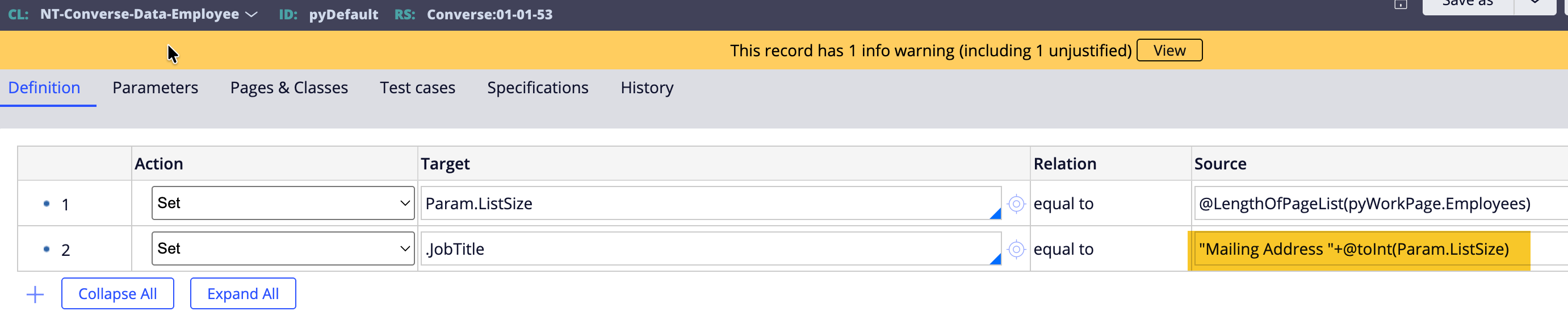
And use that property to setup on the record header
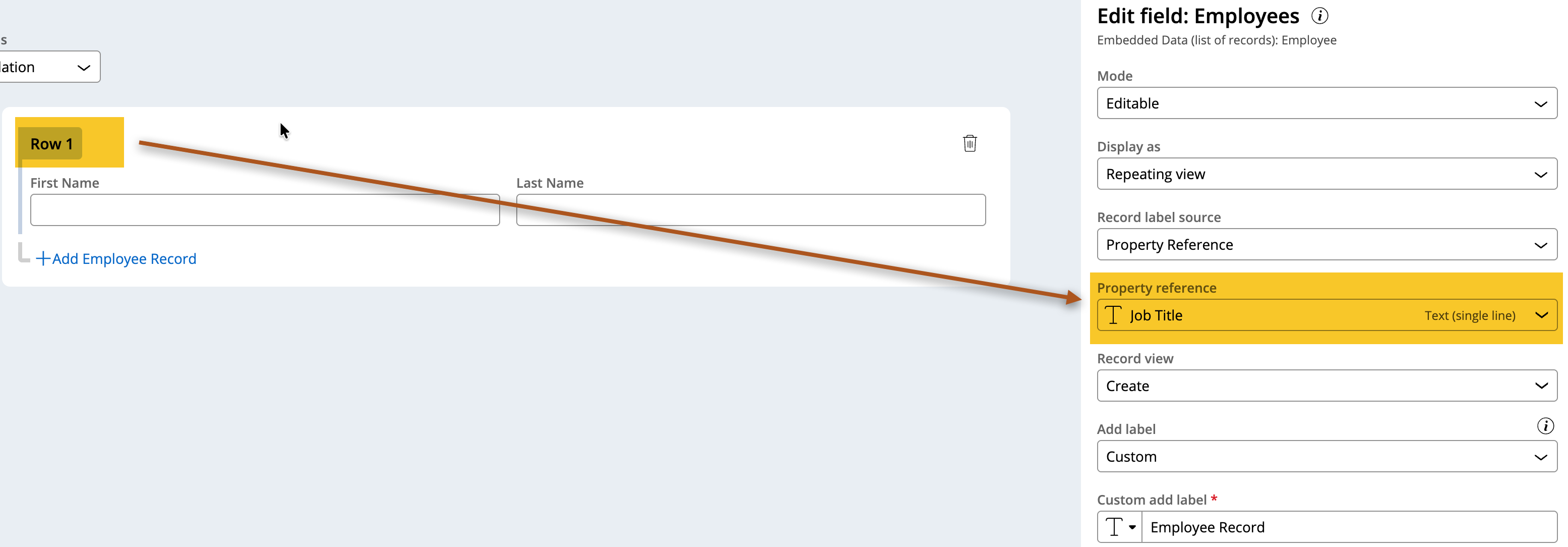
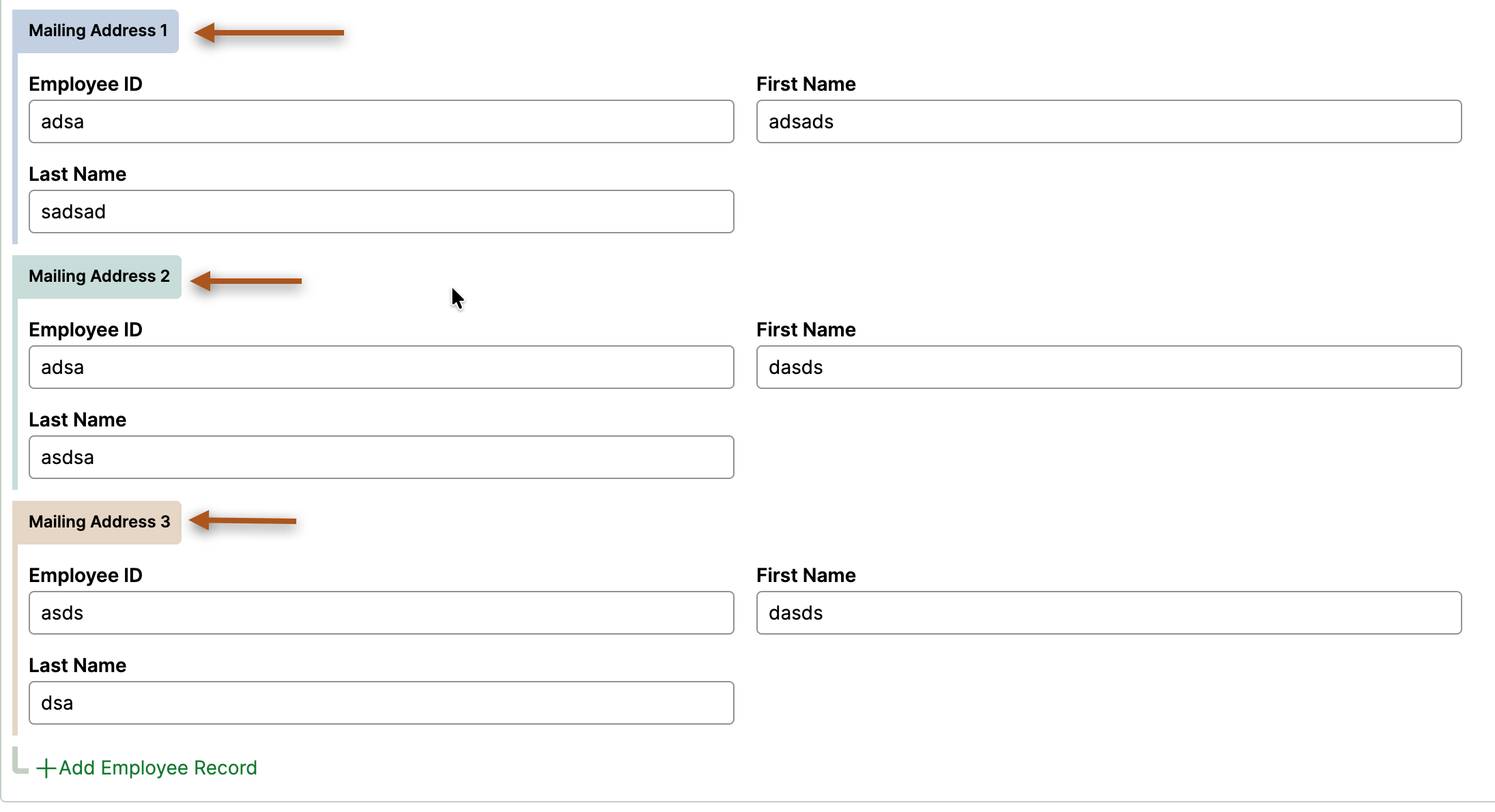
This enables you to show the header with numbering incremented for each row as shown below when you create a new record in the list.
@KANCHANGI believe you are referring to the header of each record where you can setup a property reference to showcase for each row.
If you want to increment the numbering for each row then you can do that in the pyDefault of the data class as shown below taking the length of the pagelist as shown below
And use that property to setup on the record header
This enables you to show the header with numbering incremented for each row as shown below when you create a new record in the list.
The only pitfall in this approach is that we have to hardcode the pyWorkPage in the pyDefault (if anyone has any better option, please pitch in here). Because Top does not work here as this pyDefault gets called while the pageInstructions are processed. You will not be able to have the pyForEachCount or any kind of index for that particular row here.
Hope this is what you are looking for. Let us know if its otherwise.
Thanks
JC
Virtusa Corp.
LK
@JayachandraSiddipeta thank you very much for your reply and suggestion. I followed your steps mentioned. and it worked. thanks a lot
Regards,
Kanchana