
Conversation

Erste Digital
AT
Last activity: 9 Dec 2025 10:24 EST
Side-by-side View of Attachment
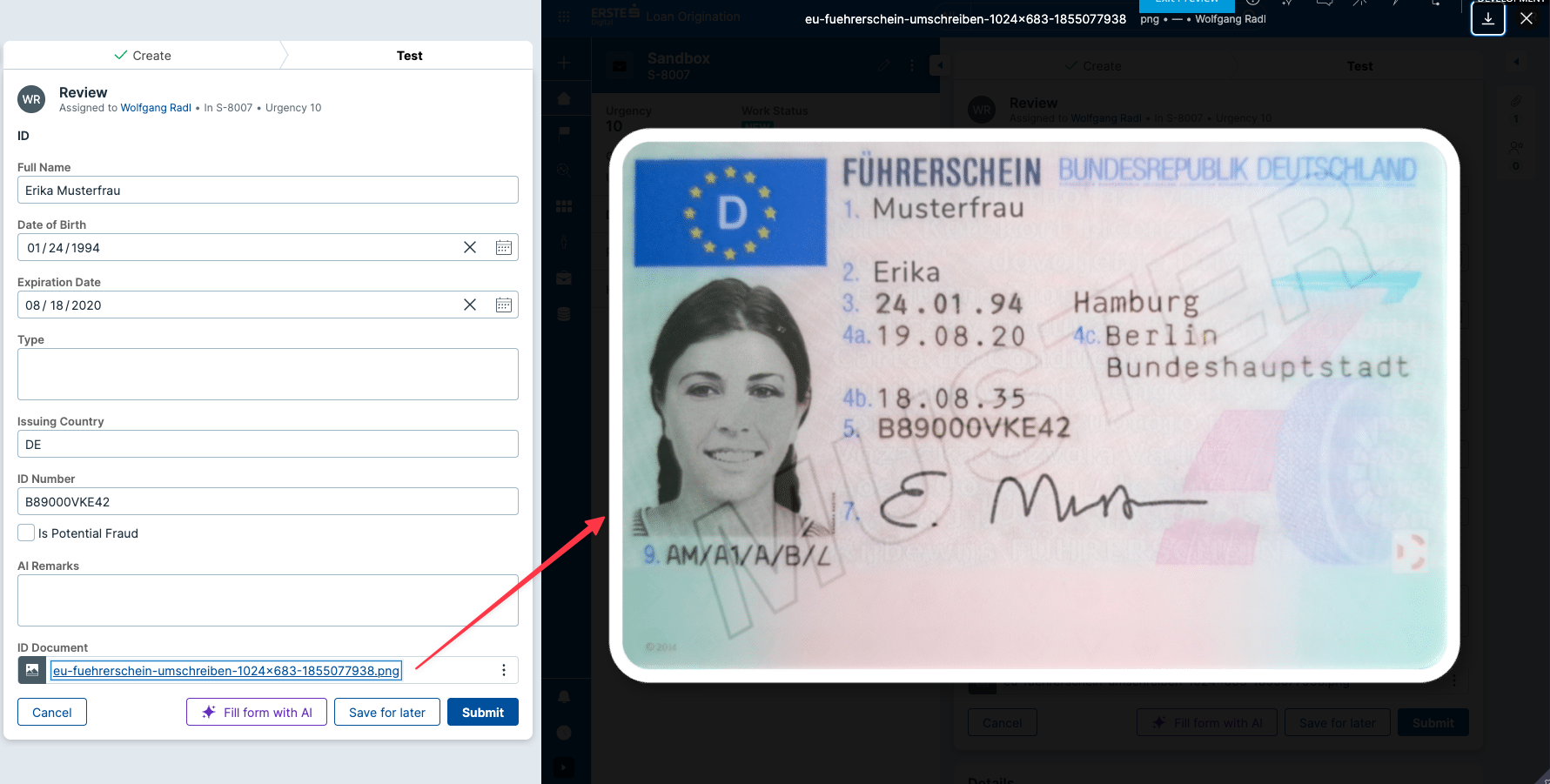
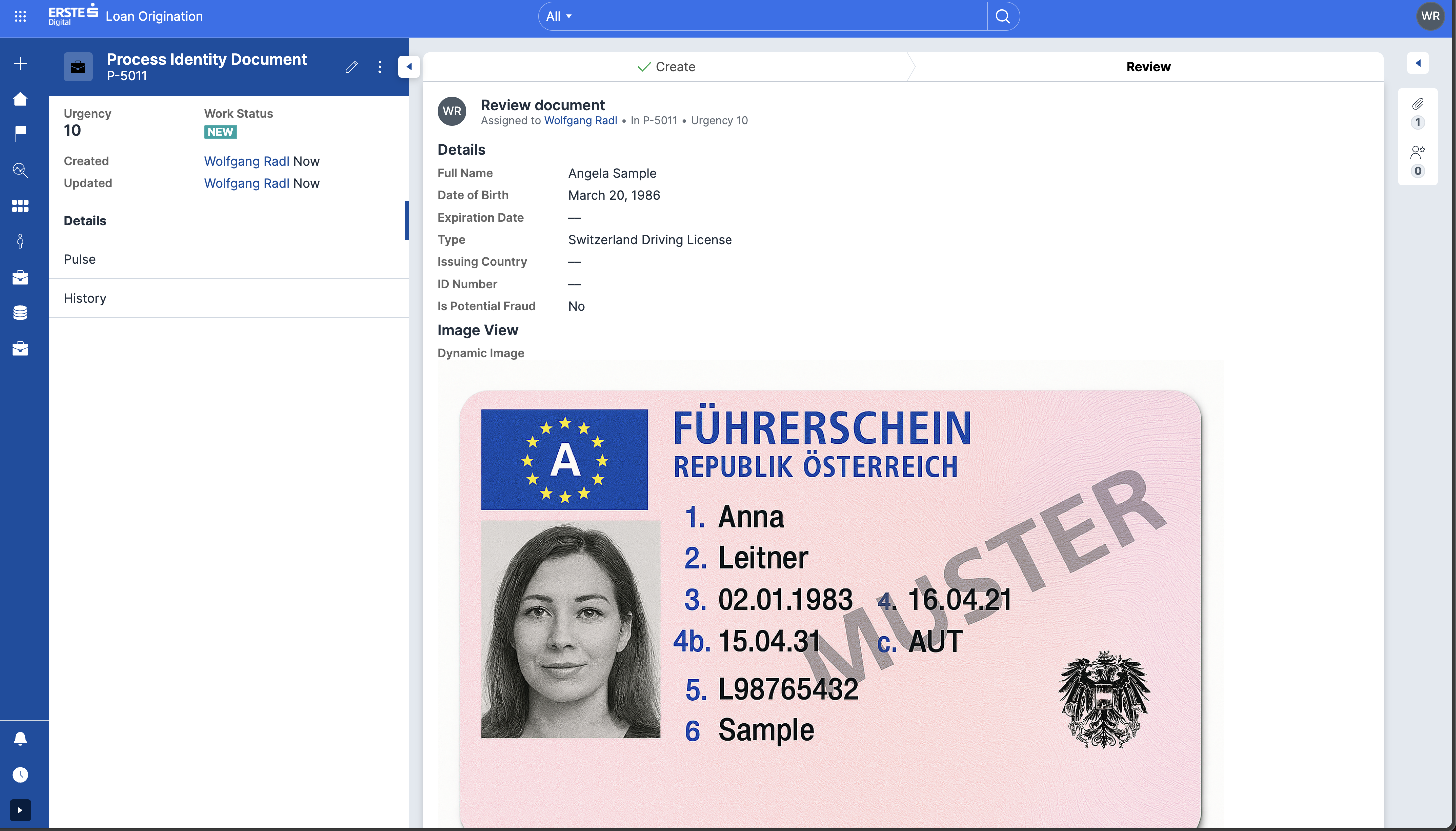
Infinity '25 introduced Document Processing capabilities powered by GenAI. However, Constellation does not seem to offer a simple way to display the attachment in a view. Because of that, users may find themselves constantly opening/closing the document to double-check data extracted by GenAI, which results in an abysmal user experience. We don't want to write a custom component for that as the plumbing seems to be here (I saw the other article posted about embedding PDFs, but in our case we do have image files and would like to use attachment type fields).
Any ideas how to best approach this?

FusionAIx
NL
What is your hesitation to use a DX component? DX components are excellent to achieve certain outcomes which are not available out of the box.
For this specific use case we already created a DX component, see attachment (as I agree, the employee want to see them side by side to ensure the filled in details are correct).
My general advise is; connect to Pega to get it on the roadmap and in the meantime use a DX component to fulfill the requirement. Once Pega implemented the Component, deprecate your own.
Erste Digital
AT
- Custom DX Component = we own the codebase & are responsible for maintenance, including compatibility with future Infinity upgrades
- Out of the box = Pega's responsiblity, less potential for tech debt, clearly defined support structures and responsibilities
I'm not saying I'm against building DX components, but this just feels like something that should have made it into the product. But point taken - I'll reach out to my client success manger to make sure we create an enhancement request. Thank you!
FusionAIx
NL
Got your concern, I think it is already way better than in Traditional UI. From experience, the constellationJS engine is quite stable on updates. If they are just components which are used for presentation purposes the risk of compatibility issues is relatively low. If you start introducing external functions/libraries, you should be more careful.

LTIMindTree
US
@mrwolf2 we can always use URL property type and select display as "Image" option to directly display image. We dont need any custom component to display. We can either set the url of the image or base64 stream of the image to that URL property.
Erste Digital
AT
@robotvinay that's a great idea. Not sure how to do this for an Attachment field, but I'll look into it. Thank you for the suggestion!

Novitates
IN
@mrwolf2 Your requirement can be implemented by creating a custom layout component (Form-Region) named "PreviewLayout" which should be supporting 1,2,3 columns and accepting instructions, fields and views for rendering the heading and children.
The preview link to the document should be a separate custom component which should have below parameters,
Name: PreviewLink
Type: Text Input
Parameters:
Content Access Mode : External Link / Data Page/ Base64 Encoded Data Content Type : Image (jpg, gif, png) / Document(doc, docx, pdf, ppt) Display mode : Link/ Icon/ Primary button / Secondary button
Now this link has to be placed in the layout in a desired place in the PreviewLayout component sourcing the document from either and external link or data page or current property containing base64 encoded string.
@mrwolf2 Your requirement can be implemented by creating a custom layout component (Form-Region) named "PreviewLayout" which should be supporting 1,2,3 columns and accepting instructions, fields and views for rendering the heading and children.
The preview link to the document should be a separate custom component which should have below parameters,
Name: PreviewLink
Type: Text Input
Parameters:
Content Access Mode : External Link / Data Page/ Base64 Encoded Data Content Type : Image (jpg, gif, png) / Document(doc, docx, pdf, ppt) Display mode : Link/ Icon/ Primary button / Secondary button
Now this link has to be placed in the layout in a desired place in the PreviewLayout component sourcing the document from either and external link or data page or current property containing base64 encoded string.
You PreviewLayout component should be intelligent enough to identify the link click and render the document in a preview pane which will slide from right to left and will occupy the right hand side of the screen. You existing layout fields should be responsive enough to adjust themselves into a stacked layout while the preview occupies half of the screen. User should be able to close the preview and the layout re-adjusts itself normally as per initial layout configuration.
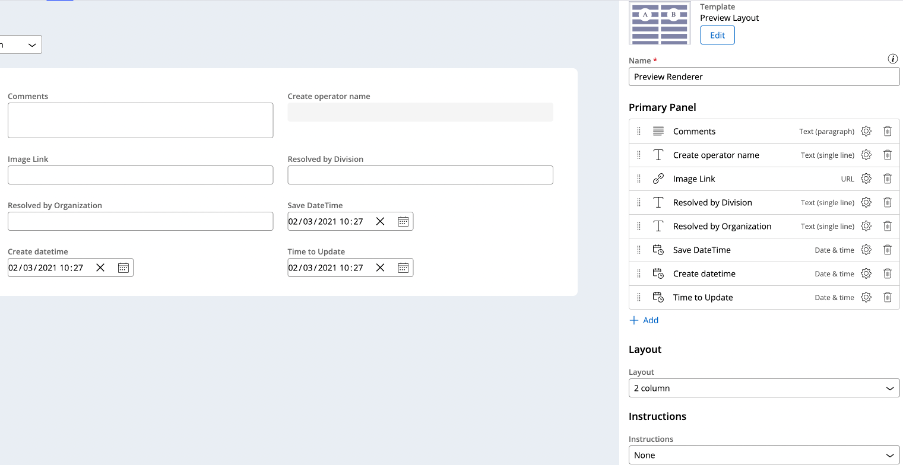
Below is the demonstration of the component built with above requirement as a POC.
Novitates
IN
@robotvinay URL type field only accepts content with valid URL including the protocol (http://, https:// etc.). Hence you cannot use a URL type property which has base64 encoded content and use the Image as the display option.

You have to write custom component to show various multimedia content sourced from either a data page or a property containing base64 encoded string. Below is sample demonstration component which handles all 4 types of multimedia Barcode, QR Code, Image and Videos and can be sourced from both Data page and Property reference.
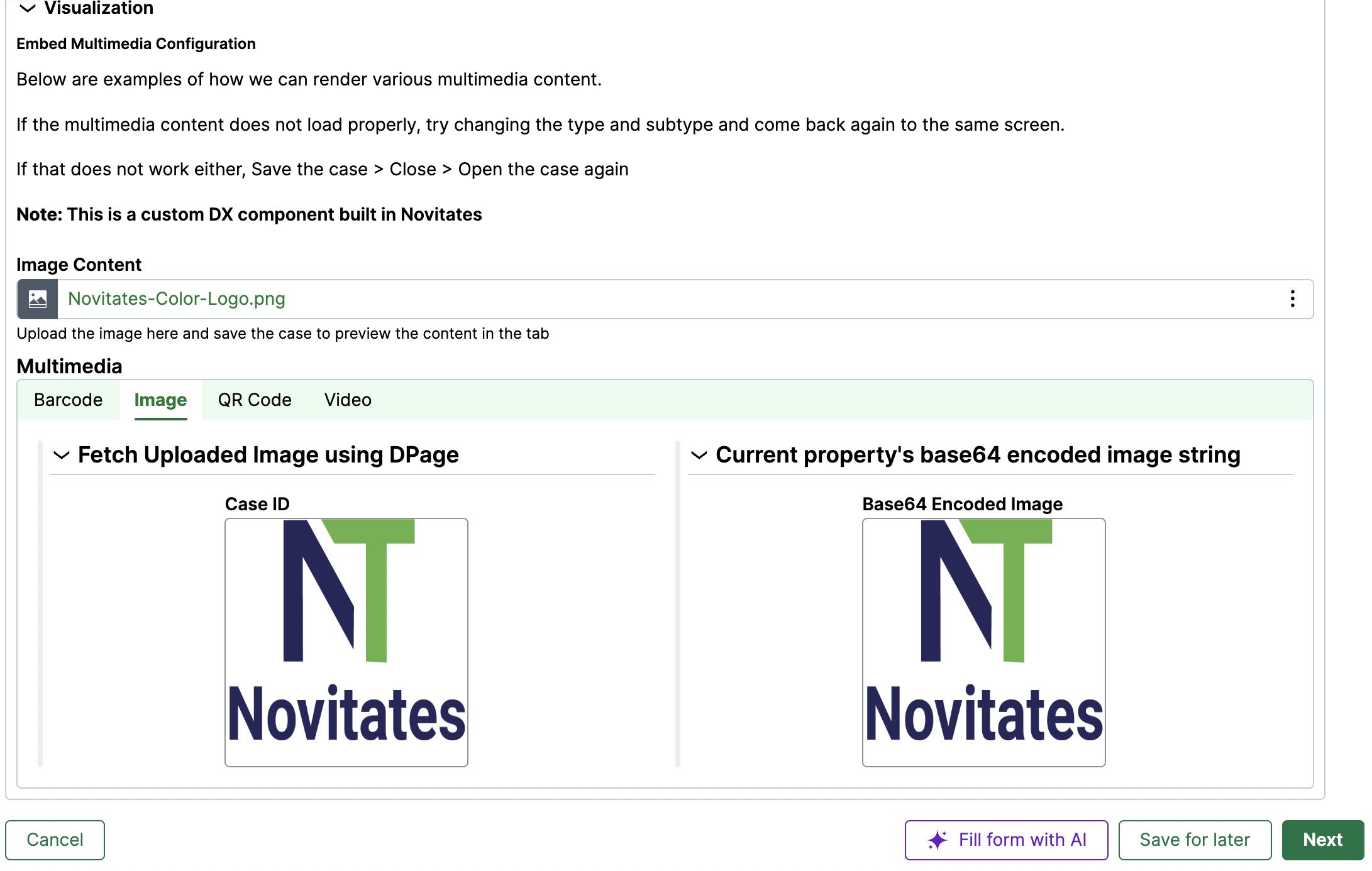
Thanks
Jayachandra
LTIMindTree
US
@JayachandraSiddipeta we have tried in our application . It worked for us. We have to add "data:image/png;base64," before our stream to display as a image
This prefix will vary based on png or jpeg or jpg
LTIMindTree
US
@JayachandraSiddipeta
We have an attachment property (ImageCapture) in the case type class. When an image is uploaded, this property stores the pxAttachmentKey. The goal is to display this image dynamically in the UI.
@JayachandraSiddipeta
We have an attachment property (ImageCapture) in the case type class. When an image is uploaded, this property stores the pxAttachmentKey. The goal is to display this image dynamically in the UI.
Steps
1. Create a Dynamic Image Property
- In the case type work class, create a property called
DynamicImage(type: URL). - This property will hold the Base64 image string.
2. Configure Declare Expression
- Use a Declare Expression to populate
DynamicImagewith the following expression:
"data:image/jpeg;base64,"+D_AttachmentContent[AttachInsKey:.ImageCapture.pxAttachmentKey,PopulateAttachStream:"true"].pyAttachStream
- Here:
D_AttachmentContentis the OOTB data page that retrieves attachment content.pxAttachmentKeyfromImageCaptureidentifies the uploaded image.pyAttachStreamprovides the Base64 stream of the image.
3. Attempt Direct Display in Form View
- Place the
DynamicImageproperty directly in the Form View. - Set Display As → Image.
Issue: This approach does not work in Form View due to rendering limitations.
4. Create a Partial View
- Create a new Readonly View (e.g.,
DynamicImageView). - Add the
DynamicImageproperty to this view. - Set Display As → Image for the property.
5. Embed Partial View in Form View
- In your Form View, include the
DynamicImageViewas a Partial View. - This ensures the image renders correctly.
Result
The uploaded image now displays dynamically in the Form View using the Base64 stream.
✅ Key Takeaway: Form Views may not render dynamic Base64 images directly. Using a Partial View with Display As → Image resolves the issue.

Pegasystems Inc.
CA
@robotvinay I have tried this solution in 25.0 version. I followed the same exact steps.
1. Create a attachment property in the Case layer
2. Create another property(DynamicImage) to store the base 64 image details (Property type is URL - Display as - Image)
3. Run the Data transform and append the base 64 as below
DynamicImage = "data: image/jpeg;base64, "+D_AttachmentContent[AttachInsKey:.ImageCapture.pxAttachmentKey,PopulateAttachStream:"true"].pyAttachStream
Please find the error message:
- An internal error occurred. Please contact administrator.
- Please enter a valid URL including the protocol (http://, https://, ftp://, etc.)
Please let me know if I'm missing any steps.
LTIMindTree
US
@RameshSangili I think you might have missed the "Details" / Partial view step instead of "Form" view
Pegasystems Inc.
CA
Thanks for your response. I have configured DynamicImage Property in the Partial View... However, I noticed the error is thrown in the data transform Property-Set (disagl.
LTIMindTree
US
@RameshSangili Can you check if the image is of type JPEG or JPG or PNG, because based on the type, we have to update this code "data:image/jpeg;base64," like inplace of jpeg , we should use "png" for png image type. I believe "data:image/jpeg;base64" will work for both "jpeg" and "jpg" image types
Erste Digital
AT
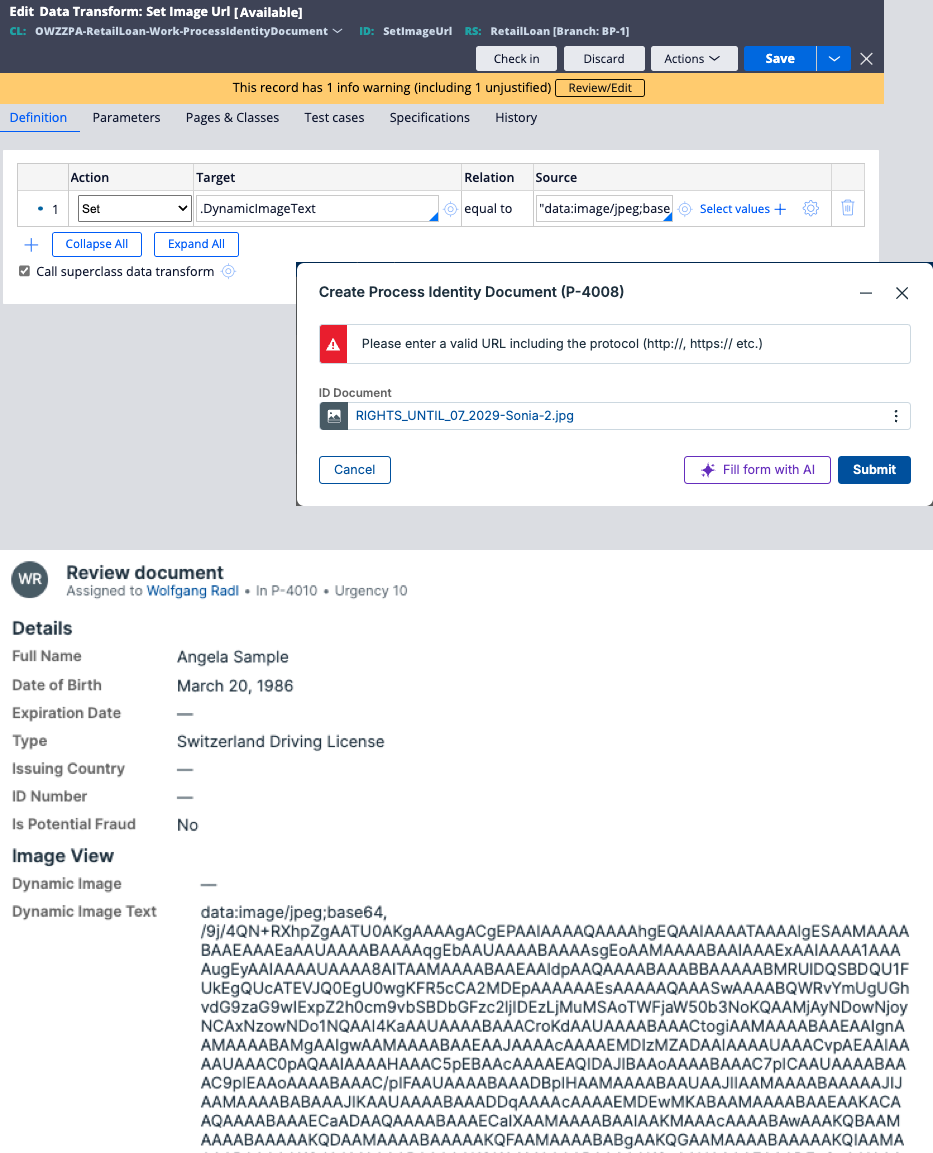
@robotvinay first, thank you for your detailed instructions! I'm encountering the same issue as Ramesh though. I made sure to use a partial view with the property present and "Display As" set to "Image", but it seems that Pega won't accept "data:" as a valid resource URI.
On the bright side, setting a property works perfectly fine - see Dynamic Image Text, a text (single line) property below. I must be missing something.. or maybe that's something Pega has changed recently - I'm on Infinity '25.1.1.
Pegasystems Inc.
CA
@robotvinay Thanks for your response.
I have tried with png and jpeg/jpg images, but it's not working as expected. I'm getting an error to include the protocol (http://,etc..). I'm not sure if something changed in 25.0 version as @mrwolf2 is also experiencing the similar issue in 25.1.1.
Thanks,
Ramesh

Novitates
IN
Hello @RameshSangili, @mrwolf2 ,
The Primary alternative to avoid such error is to utilize the declare expression approach suggested by Vinay as seen in the below screenshot.(DE Image Display), as it is observed that the declare expression is able to bypass all the validations configured at the property level.
.DynamicImage == "data:image/jpeg;base64,"+D_AttachmentContent[AttachInsKey:.ImageCapture.pxAttachmentKey,PopulateAttachStream:"true"].pyAttachStream
But , if you are keen on utilizing only the data transform shown in screenshot (DT Config), then you should remove the validation under the Use Validate(pxIsValidURL) show in the screenshot attached(Validate URL) of the property to avoid the error to include the protocol (http://,etc..) .
Also , Please check while using the data transform , you might end up with another error (Base64 string is too long, maximum length allowed is 256), in this scenario try to increase the length of the column in the DB to the maximum permissible limit to avoid the error show in the screenshot (Length Error).
These adjustments should help you in achieving the desired output , we have tested this setup with file type JPEG or JPG or PNG and even GIF both in 24.2 and 25.1.
Thank you!!!
Hello @RameshSangili, @mrwolf2 ,
The Primary alternative to avoid such error is to utilize the declare expression approach suggested by Vinay as seen in the below screenshot.(DE Image Display), as it is observed that the declare expression is able to bypass all the validations configured at the property level.
.DynamicImage == "data:image/jpeg;base64,"+D_AttachmentContent[AttachInsKey:.ImageCapture.pxAttachmentKey,PopulateAttachStream:"true"].pyAttachStream
But , if you are keen on utilizing only the data transform shown in screenshot (DT Config), then you should remove the validation under the Use Validate(pxIsValidURL) show in the screenshot attached(Validate URL) of the property to avoid the error to include the protocol (http://,etc..) .
Also , Please check while using the data transform , you might end up with another error (Base64 string is too long, maximum length allowed is 256), in this scenario try to increase the length of the column in the DB to the maximum permissible limit to avoid the error show in the screenshot (Length Error).
These adjustments should help you in achieving the desired output , we have tested this setup with file type JPEG or JPG or PNG and even GIF both in 24.2 and 25.1.
Thank you!!!
Novitates
IN
Attached the screenshots
Erste Digital
AT
@G. jagadish this is perfect! I decided to stick with my data transform, but removed the validation (pxIsValidURL). Thanks you all so much!

Vodafone
IN
@mrwolf2 and All, is there any automated way to compare extracted data from GenAI and image data? i mean providing some icon on UI data matched or not instead of manually checking? anyone tried to automate?
Erste Digital
AT
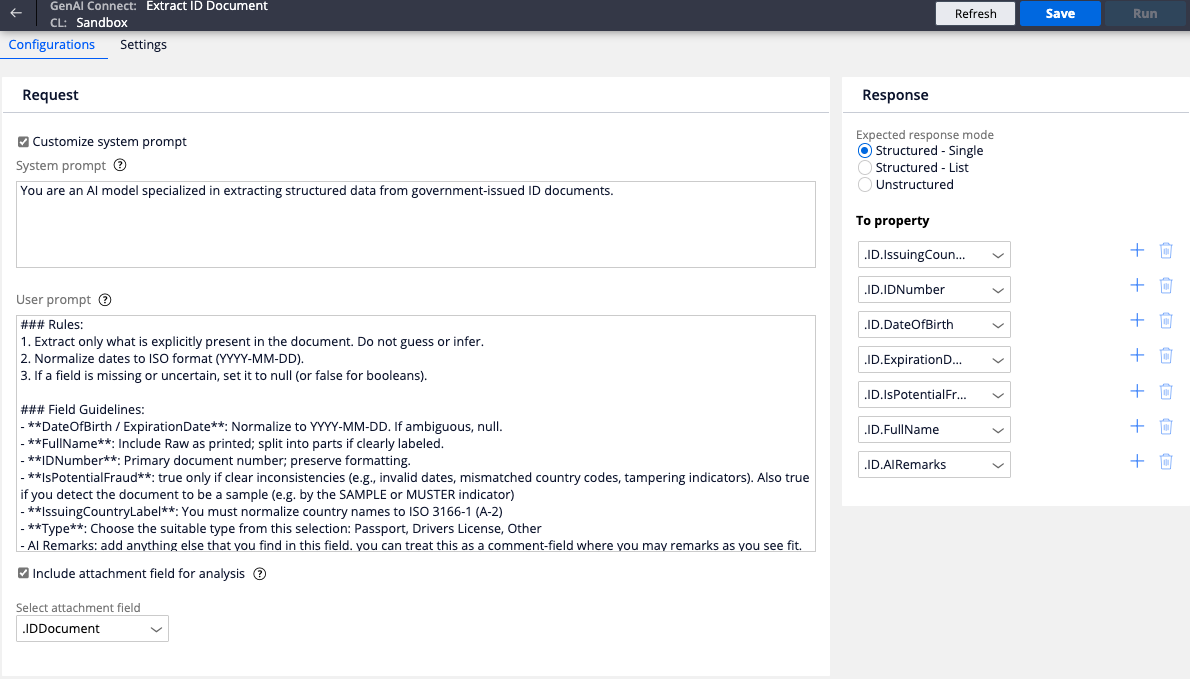
@VenkateswararaoK not to my knowledge. Current document processing abilities with GenAI are fairly limited. While you can instruct GenAI to extract the full text as well, there's no way to be sure without a human in the loop or cross-referencing extracted data against a database.
Novitates
IN
@VenkateswararaoK As @mrwolf2 mentioned you need to have a custom validation logic + 4-eye check principle before you display the extracted content on the UI based on the fields you have setup for the data to be extracted and mapped. This way you can ensure that the extracted data is validated before we move ahead. You may want to give user an option to correct the extracted data if possible and maintain an audit mechanism for governance purpose.
Thanks
JC
Pegasystems Inc.
CA
@G. jagadish @robotvinay Thanks a lot for your help! It works great!
LTIMindTree
US
@G. jagadish Thank you Jagadish for pointing out . I missed to mention that point of removing the validation at the property level