
Conversation

Novitates
IN
Last activity: 30 Dec 2025 13:41 EST
What we learned in 2025 about Pega Constellation: Key Extension Points, Overrides, and Configuration Strategies
Introduction
As Pega Constellation adoption accelerated throughout 2025, many teams moved beyond initial experimentation and started delivering real-world, enterprise-grade applications. With this shift came an important realization: Successful Constellation implementations are not about heavy UI overrides, but about knowing exactly where and how to extend the platform safely.
Over the course of multiple Constellation engagements in 2025, certain OOTB extension points, override mechanisms, and configuration patterns consistently emerged as the most effective ways to meet complex business requirements—while still preserving upgradeability, performance, and DX API compliance. At the same time, misuse of some extension points led to avoidable issues such as unnecessary refresh cycles, search performance degradation, or hard-to-maintain customizations.
This article brings together those key learnings from 2025 into a single, easy-to-reference post. It highlights the most commonly used and field-tested Constellation extension points, explains when to use them, and—equally important—calls out the caveats and best practices to ensure optimal and efficient usage.
While Pega provides many more extensibility hooks, this curated list focuses on the 10 most impactful and frequently applied options that Constellation developers and architects are likely to encounter. The intent is to provide a practical, experience-driven guide that helps you make informed customization decisions as you design and scale Constellation applications.
1. pyRefreshData - Data Transform
Purpose
Executed whenever Constellation sends a refresh request from the UI.
Usage
Override this rule at the appropriate class level when you need to:
-
Recalculate values dynamically
-
Populate derived or conditional fields
-
Render customized content on view fields during a refresh
This is especially useful when UI behavior depends on backend-driven logic rather than user input.
⚠️ Caveats & Best Practices
-
Only update fields that are visible on the UI. Invisible fields will not be sent back during save.
-
Avoid heavy processing—this method can be triggered frequently.
-
Do not treat this as a replacement for save-time validations or post-processing logic.
2. pyHideFollowAction - When
Purpose
Controls visibility of the Follow local action in the Actions menu.
Usage
Override this property in your application ruleset and set it to true to hide the Follow option globally.
⚠️ Caveats & Best Practices
-
This is an application-wide setting.
-
You cannot hide Follow for a specific case type or persona.
-
Consider business impact carefully—Follow is often useful for audit and operational tracking.
📎 Reference: For some closely related information, refer to this article Order of Actions menu
3. pxEnableC11nDev - When
Purpose
Enables visualization of Constellation-specific rule types in Dev Studio.
Behavior by Version
-
< v25
-
Rule-UI-View
-
Rule-UI-Localization
-
Rule-UI-Paragraph
-
-
v25+
-
Rule-UI-Localization
-
Rule-UI-Paragraph
-
View rules are already visualized natively (no flag required)
-
Usage
Set this to true in Private Edit and save.
⚠️ Caveats & Best Practices
-
Keep this enabled only for development or troubleshooting.
-
Do not rely on it as a permanent configuration.
-
Avoid saving application rules with this flag set unless absolutely required.
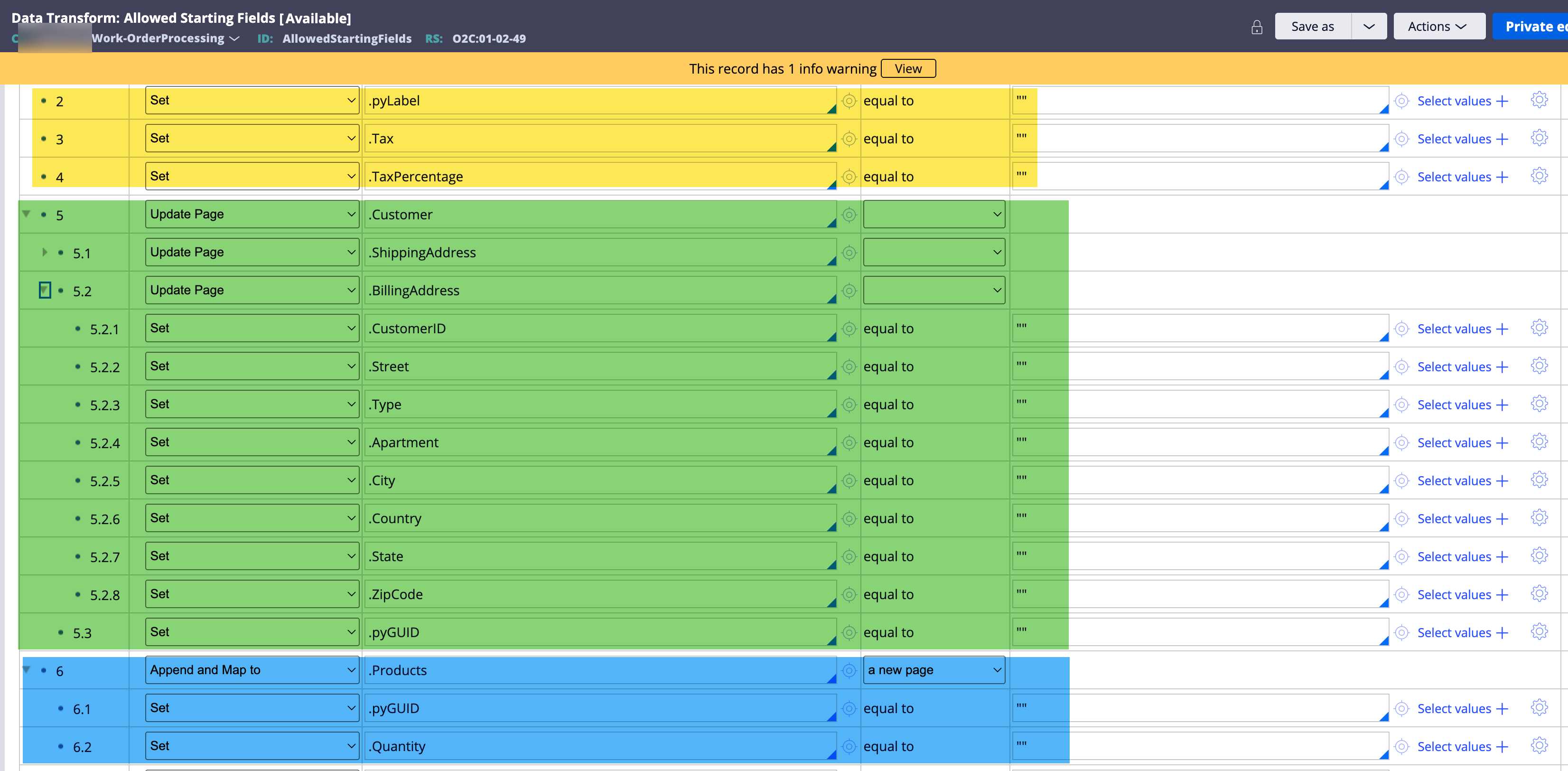
4. AllowedStartingFields - Data Transform
Purpose
Defines which fields can be populated when creating a case via DX APIs or Custom DX Components.
Usage
If your case creation request includes fields like:
-
Name
-
Address
-
Email
-
Phone
Create an AllowedStartingFields rule in the work class, and initialize these fields to blank ("").
This rule supports:
-
Scalar properties
-
Pages
-
Page Lists
⚠️ Caveats & Best Practices
-
Fields not defined here will be ignored, even if passed in the request.
-
Avoid over-exposing properties—define only what is truly needed.
-
This rule is critical for DX security and data integrity.
Snapshot of sample implementation
5. D_pyCreateMenuAdditionalEntries - Data Page
Purpose
Customize the Create menu entries (labels and case class mappings with certain conditions and business logic).
Usage
-
Extend
pyPopulateCreateMenuAdditionalEntriesin your app ruleset -
In the subclassed
pyDefaultData Transform:-
Set
.pyWorkIDPrefixif required -
Add entries to
.pxResults[]-
.pyClassName = ORG-RM-Work-Request-FOC -
.pyLabel = Free of Charge (FOC)
-
-
⚠️ Caveats & Best Practices
-
Use only for explicit business-driven menu customization.
-
Avoid duplicating OOTB behavior unless necessary.
-
Misconfiguration can lead to incorrect case creation paths.
📌 This is a focused use case—I’ll be publishing a dedicated deep-dive article on this soon. Stay tuned on Pega Expert Circle.
6. Customizing Global Search
6.1 pySearchWorkParams - Activity
Purpose
Adds advanced search filters defined by users in the UI.
Usage
-
Used in User and Case Manager portals
-
Set filter conditions using
Property-Set -
For each filter, populate the three properties in
pyParamsPage List
⚠️ Caveats
-
Improper filters can degrade search performance.
-
Always validate filter inputs to avoid empty or invalid conditions.
6.2 pyFilterSearchResults - Activity
Purpose
Applies post-processing logic after search results are returned.
Usage
-
Iterate over search results
-
Apply conditional filtering or transformations
⚠️ Caveats
-
This runs after the search—do not treat it as a primary filter.
-
Avoid complex loops for large result sets.
📎 Reference: For more details on this topic refer to this post : Customize Global Search (Shout out to @MarcCheong for his valuable insights in this article).
7. Customizing OOTB UI Messages - using Localization rules
v24
-
Use
pyGenericFields -
Or context-specific (page, case, field, etc) Rule-UI-Localization rule
v25+
-
Use Localization Configuration in the Application rule
-
Powered by overrides-based localization bundles
⚠️ Caveats & Best Practices
-
Avoid modifying base bundle rules directly.
-
Keep localization changes centralized to simplify upgrades.
-
Always test changes across personas and portals.
📎 Reference: Refer to below articles for more insights on this topic.
Explore Localization Configuration in Application rule
Update Pega OOTB Mandatory message
Update Toast messages
8. pyC11nCustomFonts - Text File
Purpose
Include custom fonts in your Constellation application.
Usage
Follow the official Pega documentation for font configuration and bundling.
📎 Reference: Adding Fonts in Constellation – Pega Docs
⚠️ Caveats & Best Practices
-
Ensure font licensing compliance.
-
Test across browsers and devices.
-
Avoid excessive font variants to maintain performance.
9. pxC11NPublishDatapageUpdate - Activity
Purpose
Triggers the auto-refresh CTA for UI components powered by a Data Page.
Usage
After updating the System of Record:
-
Invoke this activity
-
Pass the same Data Page used by the UI
This notifies users that refreshed data is available.
⚠️ Caveats & Best Practices
-
Use only when underlying data actually changes.
-
Avoid excessive refresh notifications—it can frustrate users.
-
Works best for shared lists and dashboards.
📎 Reference: Visit this article for more insights - How to notify users to refresh an outdated List View in Constellation UI
10. pyAddWorkHistoryDefaults - Activity
Purpose
Adds custom fields to Work History entries upon assignment completion.
Usage
Save-As this rule to your work class and populate additional audit or business-specific fields.
⚠️ Caveats & Best Practices
-
Keep history concise—avoid dumping large payloads.
-
Ensure consistency across assignment types.
-
History data is long-lived; design with reporting in mind.
Final Thoughts
Constellation does not eliminate customization—it channels it through well-defined extension points. Leveraging these OOTB hooks correctly helps you:
-
Stay upgrade-safe
-
Maintain compliance
-
Avoid unnecessary UI overrides
-
Deliver clean, scalable solutions
While this list is not exhaustive, it covers the most impactful extension points used in real-world Constellation implementations. Use them wisely, document your intent, and always question whether a requirement truly needs customization — or can be solved through configuration.
Feel free to add more extension points, configuration options out of your experience which will help our developer community informed.
And that's a wrap-up for this year 2025. Happy building with Constellation 🚀
Thanks
JC

Pegasystems Inc.
US
@JayachandraSiddipeta Thank you for putting this together. I will be using this as a reference going forward!