
Conversation

Virtusa
SG
Last activity: 24 Nov 2025 10:54 EST
Customize Global search in Pega Constellation
Hi Team,
I am looking for a option in Pega 25 - Constellation to customize the Global search. We want to remove the All, action and only want single case type to be allowed to search customer. As All is taking all the case type defined in the application rule form, so we cannot remove it from the application rule form as then customer will not be able to create other case type.
Is there a way to achieve this?
Scenario: When a customer visit Branch or call is received, the system should provide a Global Search feature that allows staff to quickly locate a customer by searching across all relevant records.
- The search results should display a list of customers with key details (e.g., name, contact information, account number).
- The staff will verify the customer details from the list to ensure accuracy.
- Once the correct customer is identified, they should be able to open the customer profile and perform the necessary actions (such as updating information, processing requests, or handling transactions).

Pegasystems Inc.
GB
@Gaurav25 the use of Global Search is not mandatory, you can disable this on the Channel itself. Then you can just create your own landing page, that allows them to search the one case type they want. Blueprint Import does this natively for every case type you import, you get a landing page to view/search each case types.
I prefer this option as then you can define other UX elements like what search filters they have and what columns/data they see. The Global Search View is not an authorable view, there are hacks to add more information to it but you never have full control here, as its not an authorable landing page.
That said, you could play around with the search to try and exclude results, but you won't be able to hide "all" as an option, you might just be able to change what "all" returns.
- pySearchWorkParams – Set advanced work search parameters defined by users in the UI
- pyFilterSearchResults – Apply additional filtering after search results are returned
Virtusa
SG
Hi @MarcCheong,
We need to have global search option, let me explain this with the scenario.
When a customer visit Branch or call is received, the system should provide a Global Search feature that allows staff to quickly locate a customer by searching across all relevant records.
- The search results should display a list of customers with key details (e.g., name, contact information, account number).
- The staff will verify the customer details from the list to ensure accuracy.
- Once the correct customer is identified, they should be able to open the customer profile and perform the necessary actions (such as updating information, processing requests, or handling transactions).
Pegasystems Inc.
GB
@Gaurav25the business outcome is clear, your users need to be able to search, view and update customer records. Global Search is the interpretation of that requirement and is a great OOTB feature for delivering working software quickly. However, this page is not configurable, so you will likely have implementation problems trying to achieve the UI requirements you are after. I would encourage looking at other ways to achieve the business outcome, I'll run though an example to help.
A landing page, with promoted filters OR the OOTB search can achieve the same outcome for you. I've shown the equivalent from a recent Blueprint build I did for illustration purposes.
@Gaurav25the business outcome is clear, your users need to be able to search, view and update customer records. Global Search is the interpretation of that requirement and is a great OOTB feature for delivering working software quickly. However, this page is not configurable, so you will likely have implementation problems trying to achieve the UI requirements you are after. I would encourage looking at other ways to achieve the business outcome, I'll run though an example to help.
A landing page, with promoted filters OR the OOTB search can achieve the same outcome for you. I've shown the equivalent from a recent Blueprint build I did for illustration purposes.
- The search results should display a list of customers with key details (e.g., name, contact information, account number).
- The staff will verify the customer details from the list to ensure accuracy. (as above)
- Once the correct customer is identified, they should be able to open the customer profile and perform the necessary actions (such as updating information, processing requests, or handling transactions).
- Edit action direct against record
- OR click on name and open "full case page"
- Edit action direct against record
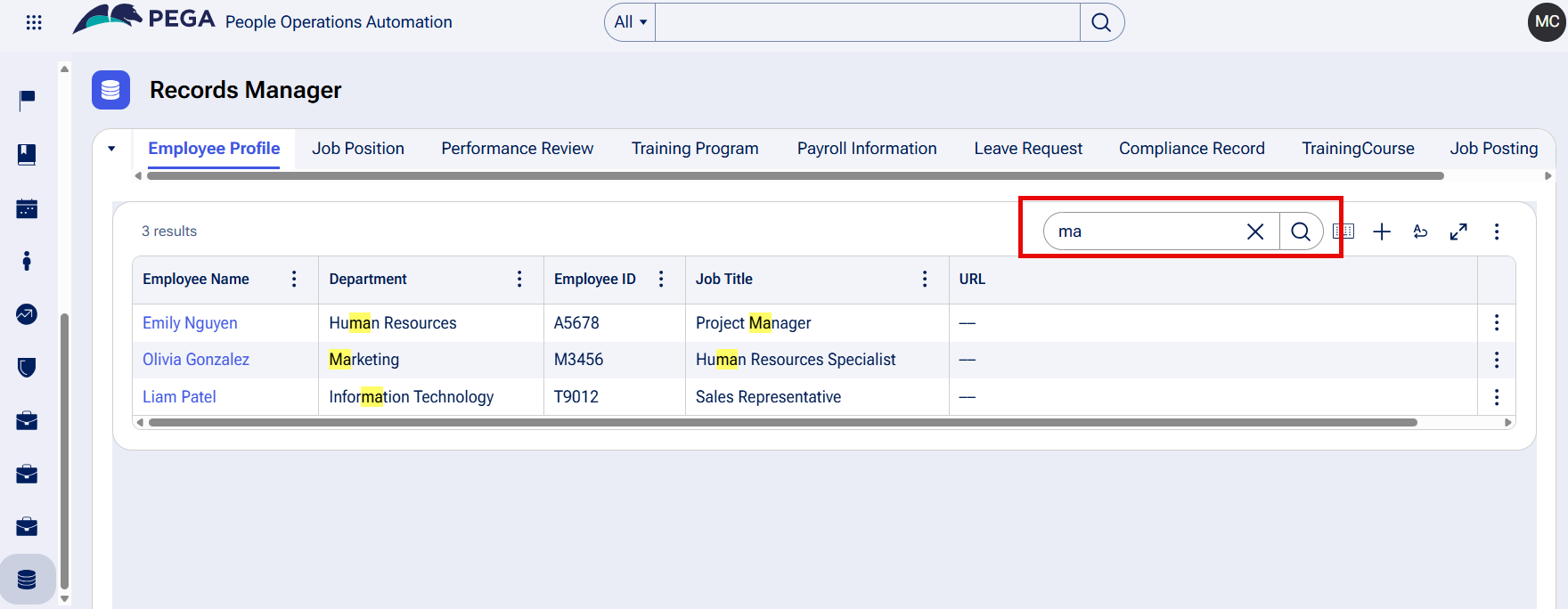
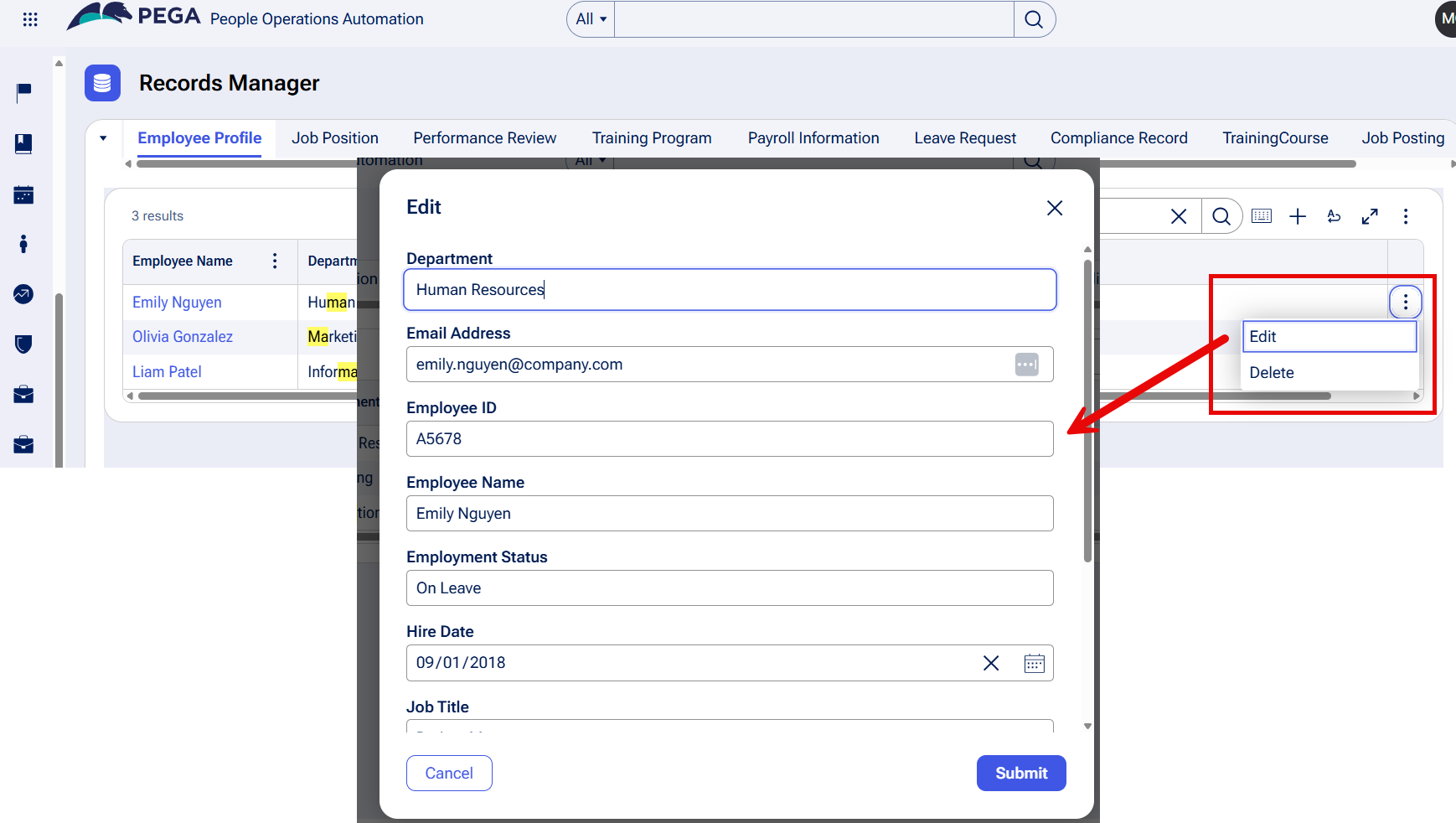
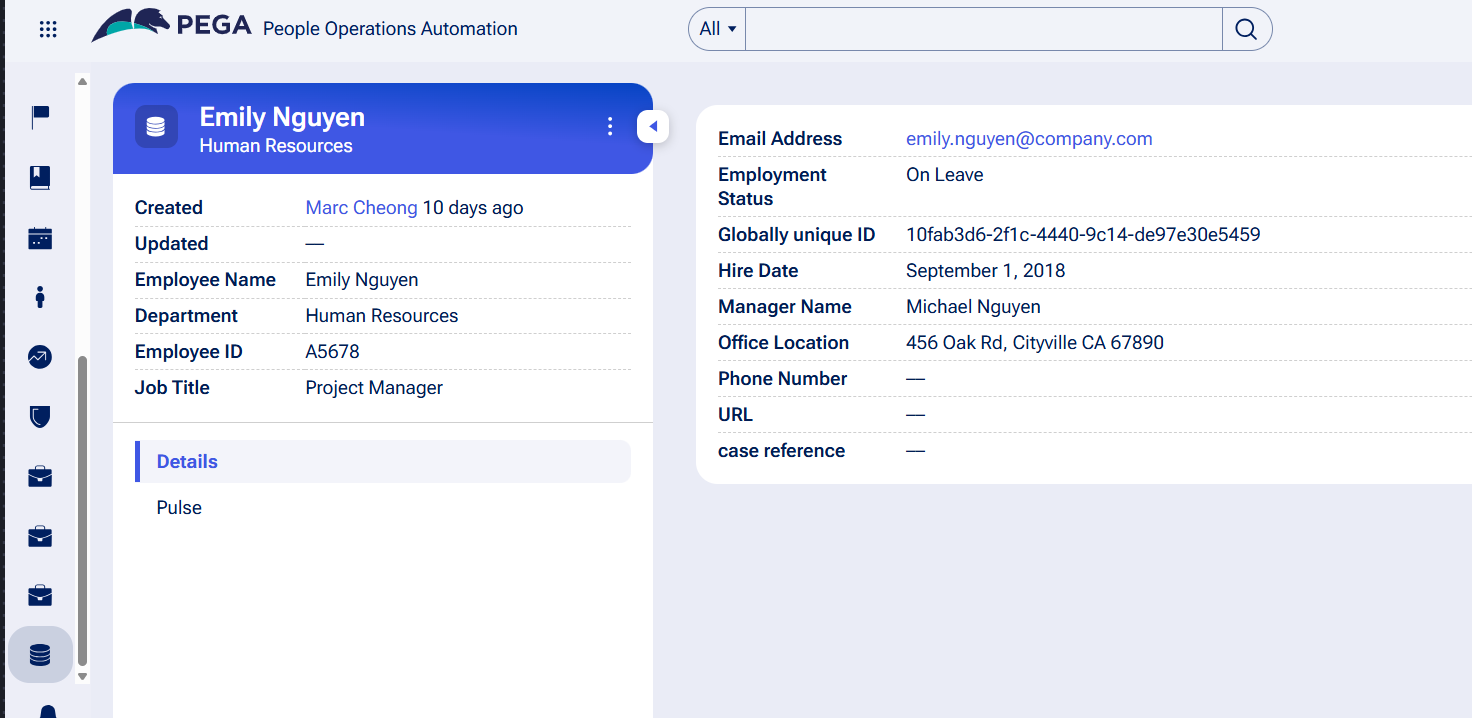
Virtusa
SG
Thanks @MarcCheong, As I understand it, when using the Landing Page, the page first loads all details and the filter then runs afterward to narrow down what is displayed.
As mentioned earlier, we need the global search to appear first. When the call center receives a call, they should be able to search and verify the customer’s details before adding any tasks. They should not see customer details by default, as this would create data privacy concerns.
Pegasystems Inc.
GB
@Gaurav25 i feel i'm confused here. Pega Customer Service has its own ID&V process built into the interaction - the Global Search was not designed to do ID&V and would actually introduce privacy concerns. Call center should be using that flow?

Heimstein
CH
You correctly stated that the cases in the search bar are the ones listed on your application rule.
But note that you do not need to have cases on the application for them to show up in the create menu. You are able to add cases to the create menu. Refer to the DataPage D_pyCreateMenuAdditionalEntries, respectivally its loading DataTransform pyPopulateCreateMenuAdditionalEntries, in which you can populate extra cases using .pxResults().pyClassName /.pyLabel
Best Regards,
Pascal

Pegasystems Inc.
PL
@Pascal.HausammannIMO keeping case types on application definition is a best practice. When removed it can affect some other functionalities.
Pegasystems Inc.
GB
@Kamil Janeczek with things like Insights, which won't know you can run Insights on those case types. And things like deeplinking to cases, the pyRoutingTable, which sets this, won't generate URLs for those case types.
Pegasystems Inc.
PL
@MarcCheongthank you, this is exactly what i meant by saying other functionalities :)