
Conversation

AT
Last activity: 15 Nov 2025 7:41 EST
Get Next Work: How to avoid moving Assignments to Worklist with Pega Constellation
We found an unexpected behavior when using Get Next Work with Pega Constellation. See this Support Question: Get Next Work: How to avoid moving Assignments to Worklist with Pega Constellation | Support Center
Maybe you, as Community may help with our questions: Is this a known limitation? Is there any workaround to fulfill my requirement?
Thank you in advance.
Pegasystems Inc.
IN
@BenediktL17468176
There is a function pzOpenAssignmentForGetNextWork that is being referred in the findAssignmentInWorklist and findAssignmentInWorkbasket activities to retrieve the next work item. Inside this function, the MoveToWorklist activity is called. Adding a condition before calling MoveToWorklist might resolve the issue, but since this is a final rule, it cannot be modified as a workaround.
One possible approach I could think is to create a custom function similar to pzOpenAssignmentForGetNextWork, where you either conditionally call MoveToWorklist or remove that call entirely. Then, update the findAssignmentInWorklist and findAssignmentInWorkbasket activities to reference your new function instead of pzOpenAssignmentForGetNextWork, as these activities are available for modification.
Updated: 11 Nov 2025 11:47 EST

Pegasystems Inc.
GB
@BenediktL17468176 see above from @sandd1 :)
However, can I ask what is the business outcome you are trying to achieve? The whole point of Get Next Work is to give the person clicking it the next piece of most urgent work, based on their skills/access, for them to work on. Any attempt to modify this logic and experience might not be advisable (even if possible).
- Is the user trying to look at the work that they might be allocated and accept it?
- Are we seeing people forget they have been assigned this work and then leave it to be unactioned?
You could look at other ways to address this, like some kind of "accept" action or SLA's that move it back to the work queue if not actioned in x amount of time. This would be more closely aligned with OOTB configurations available in Pega.
d-fine
DE
@MarcCheongand @sandd1 Thank you for your replies. I am currently assessing whether the workaround proposed by @sandd1 works for us (looks promising so far), but I am also not sure whether we actually should modify Get Next Work this deep in the code. Basically we would use a workaround to change the behavior of rules marked as final; I do not feel too good about that either, especially I think there could be some issues in the future if the way Get Next Work works would change.
We want the Get Next Work feature to give the person clicking it the next piece of most urgent work, the only thing we do not want is that the assignment is moved to their worklist; so I do not think that what we want would interfere with the main point of Get Next Work. Actually I think what we are asking for was working fine prior to constellation simply by setting the Application setting GetNextWork_MoveAssignmentToWorklist to false.
@MarcCheongand @sandd1 Thank you for your replies. I am currently assessing whether the workaround proposed by @sandd1 works for us (looks promising so far), but I am also not sure whether we actually should modify Get Next Work this deep in the code. Basically we would use a workaround to change the behavior of rules marked as final; I do not feel too good about that either, especially I think there could be some issues in the future if the way Get Next Work works would change.
We want the Get Next Work feature to give the person clicking it the next piece of most urgent work, the only thing we do not want is that the assignment is moved to their worklist; so I do not think that what we want would interfere with the main point of Get Next Work. Actually I think what we are asking for was working fine prior to constellation simply by setting the Application setting GetNextWork_MoveAssignmentToWorklist to false.
The business outcome we want to achieve is simply that assignments picked by GNW (which are the ones deemed the most urgent) are not "blocked" by a user due to the assignment being moved to their WL. Scenarios where this would be an issue are for example: User just stops working for the day before finishing the assignment for any reason (urgent call incoming, break, sick, browser crashes etc.) or the user decides that they can not or want not to work on that assignment now and clicks "Save for Later" or "Cancel". For business it is important that the assignment can be worked on by everyone again once the lock is gone.
I do not think that putting some kind of "accept" action in would result in a good user experience, also this would not be able to cover all scenarios.
I already implemented some workaround similar to the SLA approach you suggested and this works in principle, but it is not exactly the behavior that we want. An issue that we have with that is for example the following scenario: User clicks Get Next Work, gets an assignment and realizes that the case is too complicated for them to work on, they just close the case (to release the lock) and ping a more experienced colleague to work on this. If the SLA has not fired yet, the colleague cannot start working on the case immediately because the assignment is still in the worklist of the other user. This is not the user experience we aim for. I understand that we could provide the user with some optional action to manually route to case back to the workqueue but we do not want to bother our users with such tasks; the application should be as simple to operate as possible.
Updated: 12 Nov 2025 11:19 EST
Pegasystems Inc.
GB
@FelixH77 interesting, I did not even know this DSS existed. Thanks for the learning.
As far as I read the documentation, this should still work in Constellation. It is neither marked a UI Kit nor Constellation feature.
I'm going to make some follow up enquiries, but I would definitely raise a support ticket in My Support Portal. The new features in Constellation, the way I read this, should still honour this existing infrastructure.
d-fine
DE
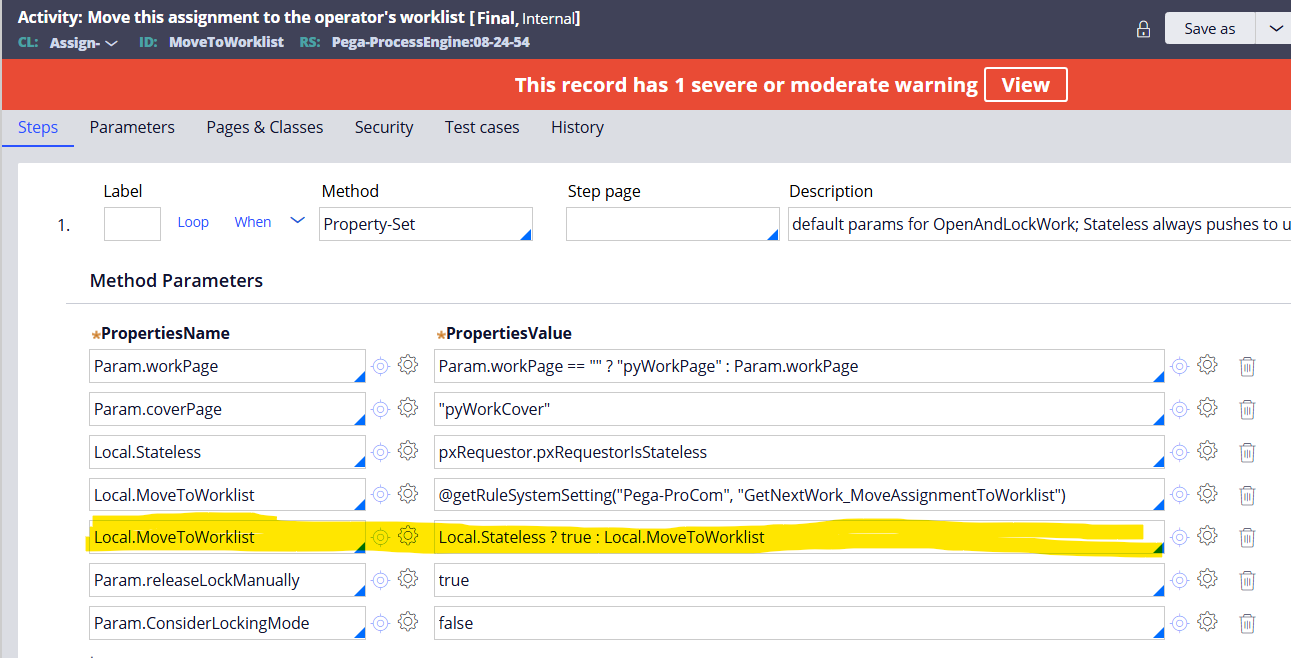
@MarcCheongjust a quick update from my side: The workaround along the lines suggested by @sandd1 seems to work. I created a variant of MoveToWorklist were I removed this one row marked in the Screenshot, with that the GetNextWork_MoveAssignmentToWorklist setting is honoured again. In order to call it I had to create basically a copy of the function pzOpenAssignmentForGetNextWork with the only change beeing that my version of MoveToWorklist is called instead of the original one. To call this function I had to modify findAssignmentInWorkbasket.
So in the end the only change needed to get the GNW feature to work as we need it is the removal of this one line, the other changes are only required because MoveToWorklist is final.
I am still not completely happy with this, because a) I think there probably is a reason behind this line that I removed, even though I could not identify any issues with it removed and b) due to copying these final rules issues might arise after upgrades to future versions of Pega, so I will raise a support ticket as you suggested.
Updated: 15 Nov 2025 7:41 EST
Pegasystems Inc.
GB
@FelixH77 thanks for sharing.
I see also you had this on Support. Linking here in case someone needs access in the future
https://support.pega.com/question/get-next-work-how-avoid-moving-assign…
and Pega Docs on the topic:
https://docs.pega.com/bundle/platform/page/platform/case-management/cus…