
Conversation

HCLTech
NL
Last activity: 20 Jan 2026 8:56 EST
Insight column not showing in Landing Page when using Declare Index (Product Number)
I have a requirement where users should be able to search cases based on Product Number and Case ID.
A customer can have multiple products, so for each case we maintain a Page List of Products.
I created a Declare Index for this page list and exposed the Product Number property through the index.
When I create an Insight, add the Product Number column, and promote it as a filter, everything works correctly inside the Insight.
However, when I embed the same Insight in a Landing Page:
- The Product Number column does NOT appear
- The Product Number promoted filter DOES appear
- The filter also works correctly when I enter values
- But the column still does not display in the landing page view
I also tried creating a Report Definition using the Declare Index and using an Association, but the behavior is the same.
I’ve attached screenshots showing the issue.
Has anyone experienced this before? Is there any specific configuration required for indexed properties to appear as visible columns when Insights are embedded in Landing Pages?

Novitates
IN
@Mohan Rao Alladi Indeed its a valid issue. My best guess is that you might be in v24.2.1. Because i see the same issue in this version. Also, there is an additional issue where if i try to drop these indexed class fields into Filters, its throwing authoring error in app studio.
Good news is that all the above mentioned issues are fixed in v25.1.1. Below is the snapshot from 25.1.1. I have created an insights for the indexed class which i have used for a POC in the below article
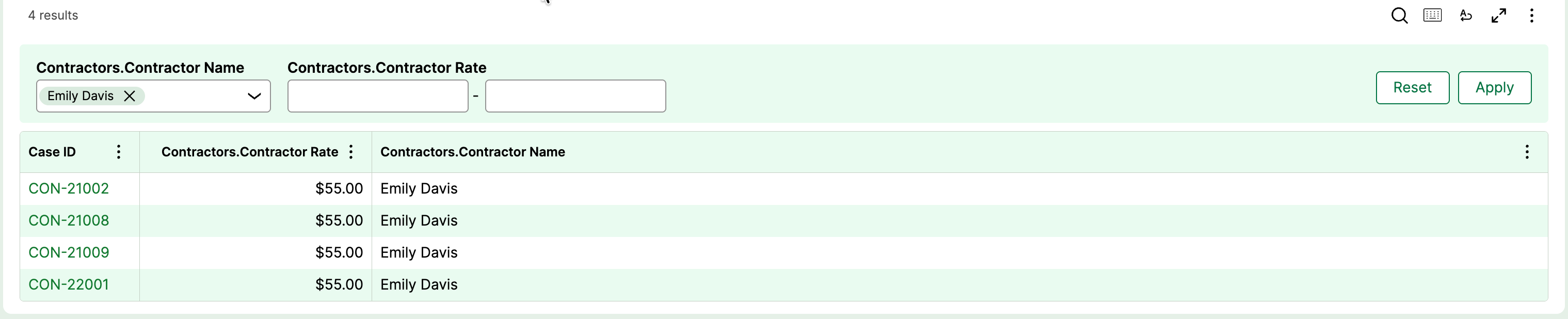
It displays all the filters and columns from indexed class. Filtration also works fine.
Now, the workaround for 24.2.1 is that you should create a dedicated data page for your indexed class and use that to generate the Insights. That will work. Below is the snapshot from 24.2.1. Top table has the issue you mentioned. Bottom table is generated using a data page on the indexed class where the filtration and others features work as usual.
For proper Case ID, either you trim the pxInsIndexedKey in the index class or specifically create a field in the indexed class and map it in the declare index from top.pyID. Either way it should work.
@Mohan Rao Alladi Indeed its a valid issue. My best guess is that you might be in v24.2.1. Because i see the same issue in this version. Also, there is an additional issue where if i try to drop these indexed class fields into Filters, its throwing authoring error in app studio.
Good news is that all the above mentioned issues are fixed in v25.1.1. Below is the snapshot from 25.1.1. I have created an insights for the indexed class which i have used for a POC in the below article
It displays all the filters and columns from indexed class. Filtration also works fine.
Now, the workaround for 24.2.1 is that you should create a dedicated data page for your indexed class and use that to generate the Insights. That will work. Below is the snapshot from 24.2.1. Top table has the issue you mentioned. Bottom table is generated using a data page on the indexed class where the filtration and others features work as usual.
For proper Case ID, either you trim the pxInsIndexedKey in the index class or specifically create a field in the indexed class and map it in the declare index from top.pyID. Either way it should work.
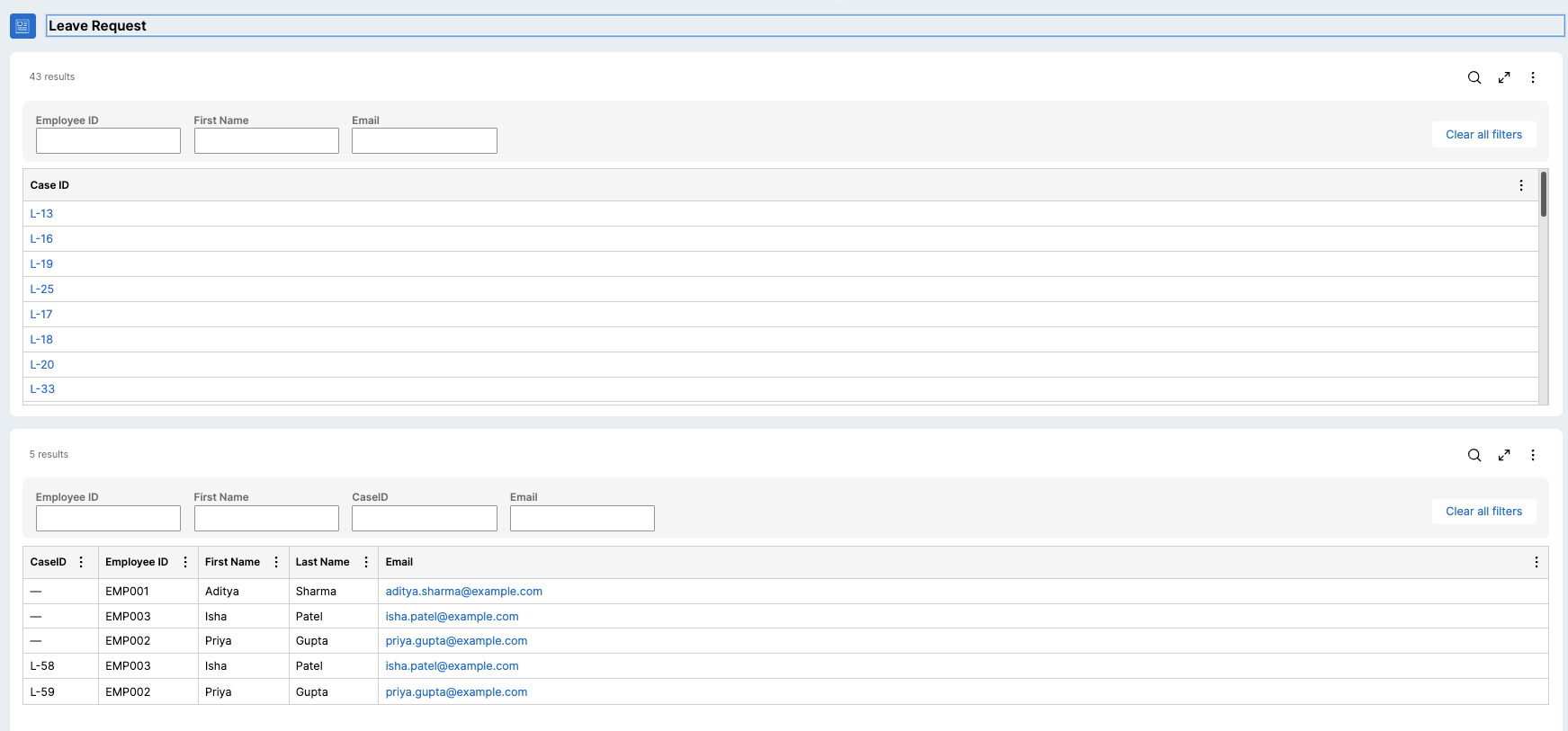
Just ensure that the indexed class fields are marked as relevant records made as primary fields so that they show up in the list while you create the insights. Logoff and close the window and open after you change the primary fields on the data class (caching strategy).
Hope this helps
Regards
JC
HCLTech
NL
@JayachandraSiddipeta Thanks for your inputs,
I also need to retrieve customer‑level data such as Customer ID and Postal Code, which are stored inside an embedded page on the case.
Since I need to filter cases based on these fields (Customer ID, Postal Code), I’m considering joining the Declare Index report definition with Work class.
My questions are:
- If I join the index RD with Work class, will the filters work correctly?
- Do I need to map all required fields into the index class/table as flat scalar properties and rely entirely on the indexed table?
- Or is there a better practice for exposing and filtering on embedded-page and indexes data inside Insights or views?
Novitates
IN
@Mohan Rao Alladi If you want to use customer level information from the indexed class, i would suggest you setup them in the declare index rule and then use them in the report.
If you want fields from both case and customer equally, then rather than going with a join, setup the association between work and customer and then use those fields in the report. Avoid table joins as much as possible.
Hope this helps
Regards
JC
HCLTech
NL
@JayachandraSiddipeta Thanks for your help
I am able to solve the issue using below article by Add the Association explicitly for use in Explore Data as mentioned in Point 4 of below article.
https://support.pega.com/discussion/utilising-advanced-associations-joi…