
Conversation

ASB
IN
Last activity: 12 Jan 2026 15:42 EST
Pega Constellation - Search & Select with picklist
Hi Team,
We have an Accounts picklist on top and below that there is a search & select configuration with search parameters of Transaction Date From & Transaction Date To. Now, When the user changes the account I need to reset the Transaction Date From & Transaction Date To.
And We are getting these Transaction Date From & Transaction Date To filter parameters inside data page by using Param.pyImplicitParameter So, whenever on the initial search it is passing Param.pyImplicitParameter properly but when i change the account dropdown then UI & datapage is getting loaded but Param.pyImplicitParameter is getting empty even though it has the date values in search filters .
Note: There is a form refresh setting on Accounts Picklist property.
Could you please give us some suggestions on how we can achieve the above scenarios ? (How to reset the filters on change of account & how to pass the search parameters on change of the account)

Pegasystems Inc.
GB
@RajeshM17245081 the Search and Select form uses a transient container to build the search interface. Because the container is transient, the associated fields do not participate in the main case payload, and therefore Form Refresh Settings not executed for them.
Put simply, the search and select pattern or "Advanced Search" template was not designed to be interacted with other elements. A couple of thoughts
Why not put account INSIDE the Advanced Search? Then Account, Date From and Date To are your search parameters. This then groups those elements visually (better UX) and can be leveraged together along with the 'reset' and 'search' buttons in that Component.
@RajeshM17245081 the Search and Select form uses a transient container to build the search interface. Because the container is transient, the associated fields do not participate in the main case payload, and therefore Form Refresh Settings not executed for them.
Put simply, the search and select pattern or "Advanced Search" template was not designed to be interacted with other elements. A couple of thoughts
Why not put account INSIDE the Advanced Search? Then Account, Date From and Date To are your search parameters. This then groups those elements visually (better UX) and can be leveraged together along with the 'reset' and 'search' buttons in that Component.
- If the data needs aggregation, you can view these very good Constellation 101 articles from @Aditi Mehta and @MACIEJ Dybal:
You could do other things like build your own search (with top level fields and screeflows) or your own DX Component (see Constellation 101 articles there is one on that for custom validation) but the option above seems to make the most sense from a UX perspective and quickest time to build the outcome required? (Search transaction on an account)
ASB
IN
@MarcCheong Hi Marc, My Accounts list drop down configured with a data page and have a parameter called customerID. here accounts list will call the API and fetch the results based on the customerID. And this customerID will be coming from pyWorkPage.customerID. Now, how to pass this customerID if i Put the AccountsList INSIDE the Advanced Search.
ASB
IN
@RajeshM17245081 Hi @MarcCheong , Did you get a chance to look into my scenario ?
Pegasystems Inc.
GB
@RajeshM17245081 sorry, i missed the notification for this one.
The way I read this, CustomerID would just be a parameter of the data reference's data page? So when you setup your datamodel for "accounts", utilise a datpage that has the parameter for CustomerID. Then in that drop down select CustomerID from your Case's Data model (which would be taken from what we used to call pyWorkPage, but you can't really reference pyWorkpage anymore).
Then accounts would load for the customer in the case. The articles I shared give more detail on the setup of pass parameters etc. so they would be a good read.
ASB
IN
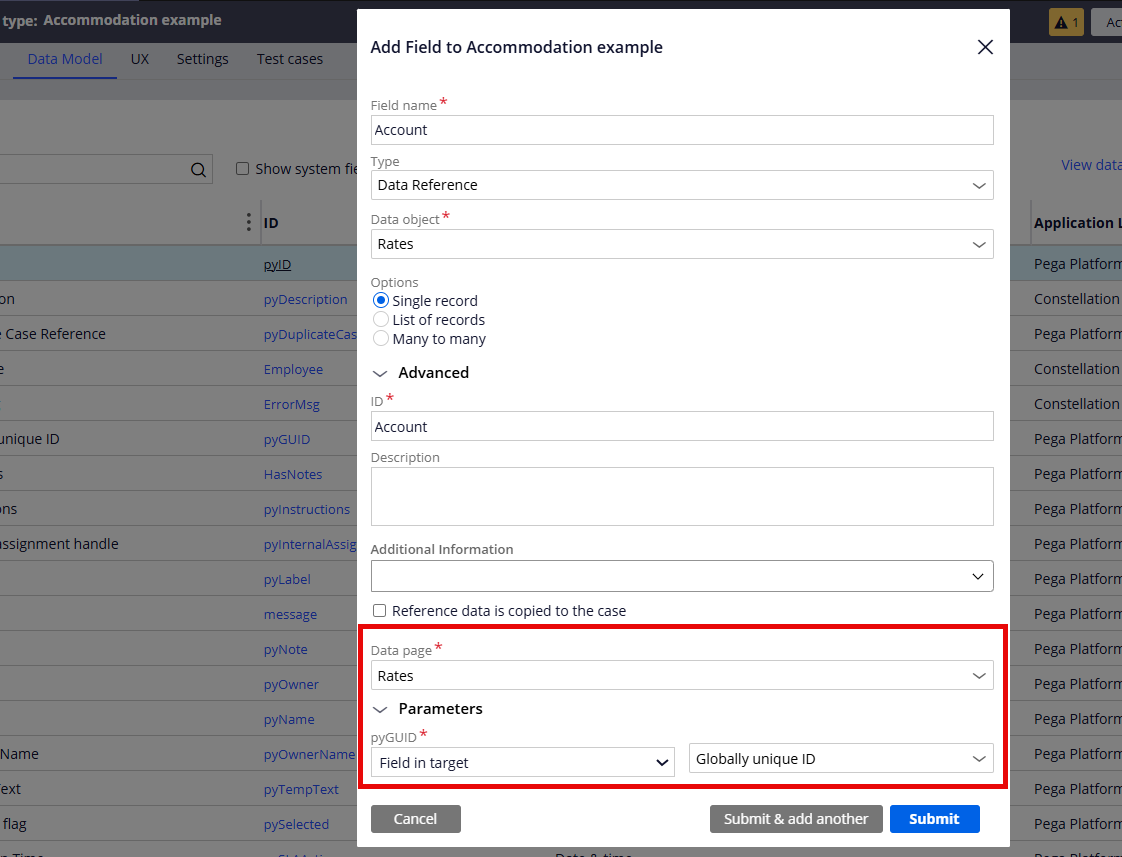
@MarcCheong Hi Marc, Sorry i think you are referencing the accounts from case which is on pyWorkPage but i need the configuration where accounts will be added inside search and select search filters, and i need to pass the parameter for this accounts picklist from pyWorkPage. Please find the screenshot attached.
I believe its not possible in constellation to pass the CustomerID from pyWorkPage to Accounts picklist which is referenced inside search and select search filters.
Pegasystems Inc.
GB
@RajeshM17245081 the datapage you select for your Data Reference is what loads the Search and Select results - so if you want to pass anything into those results this would be the way.
IF you want to pass parameters from the Search and Select drop downs then this is outlined in the below articles, you can hook into the search page this way.
- Advanced Use Cases for Search and Select Pattern
- Empty List on Load in Constellation Landing page
- Advanced Search Gadget - Limitations and alternate design
In fact there are more articles if you look on our Constellation 101, just search the page for "Search and Select", we have about 6 articles, some even go so far as customizing it with your own DX Components etc.

ASB
NZ
Hi @MarcCheong,
Is there a way to clear date filters upon changing account or card shown in the attached screenshot. Account/Card dropdown is populated from an API. Transactions are populated from another API with card/account number, transaction date from and transaction date to. Account/Card dropdown is part of search and select component.
Thanks
Vinod Bavandla